| |

| ChromePass v1.63
Copyright (c) 2008 - 2025 Nir Sofer
|
Related Links
Description
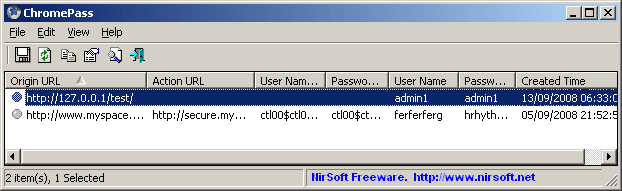
ChromePass is a small password recovery tool for Windows that allows you to view the user names and passwords stored by Google Chrome Web browser.
For each password entry, the following information is displayed:
Origin URL, Action URL, User Name Field, Password Field, User Name, Password, and Created Time.
It allows you to get the passwords from your current running system, or from a user profile stored on external drive.
You can select one or more items and then save them into text/html/xml file or copy them to the clipboard.
Known Issues
- In the latest versions of Yandex Web browser, they changed the password encryption and it's now different from the password encryption of Chrome,
so ChromePass cannot decrypt the passwords of Yandex anymore.
Versions History
- Version 1.63:
- Updated the external drive feature to decrypt the new app-bound encryption version 3 of Chrome Web browser. There is a new field you have to fill: CNG System Keys Folder (For example: K:\ProgramData\Microsoft\Crypto\SystemKeys ).
- Version 1.62:
- Added support for decrypting passwords encrypted with app-bound encryption on new versions of Chrome (Version 3 of Chrome App-Bound Encryption)
- Be aware: The new app-bound encryption (version 3) uses the Next Generation Cryptography API (CNG) to encrypt and decrypt the encryption key. Currently, the external drive feature cannot decrypt the CNG key and thus it fails to recover the passwords if you have the version 3 of Chrome app-bound encryption.
- Added 'App-Bound Encryption Version' column.
- Version 1.61:
- Updated ChromePass to read the 'Login Data for Account' file. Chrome Web browser may store passwords in this file when using a Chrome profile with Google account.
- Version 1.60:
- Added support for decrypting passwords encrypted with app-bound encryption on new versions of Chrome (Version 135). This feature only works when you run ChromePass as Administrator (Ctrl+F11).
- Added 'System Protect Folder' and 'Registry Hives Folder' fields to the external drive feature. You have to fill these fields if the passwords are encrypted with the new app-bound encryption.
- Added 'Encryption Type' column. (for app-bound encryption, this column displays 'v20', for previous encryption method, this column displays 'v10' )
- Version 1.59:
- Fixed a problem with decrypting Chrome passwords from external drive on Windows 11 22H2.
- Version 1.58:
- Fixed to display the password if it's not encrypted (Like in the portable version of Brave).
- Version 1.57:
- When decrypting Chrome passwords from external drive, you can now specify the SHA1 hash of the login password instead of the actual password.
- Version 1.56:
- Fixed the external drive feature to work properly if you sign in with Microsoft account.
- Be aware that in order to recover passwords created while you signed in with Microsoft account, you have to provide the random DPAPI password generated
for your Microsoft account instead of the actual login password. You can find this DPAPI password with the MadPassExt tool.
- Version 1.55:
- Added new file type to save the passwords list: 'Firefox import/export csv file'. When you save the passwords in this file type, you can use the import feature of Firefox to import the saved passwords into Firefox:
Import login data from a file
- In order to save the passwords as 'Firefox import/export csv file', simply select the items you want to save (or press Ctrl+A to select all passwords), press Ctrl+S (Save Selected Items), choose 'Firefox import/export csv file'
from the file type combo-box, type the filename to save and then click the 'Save' button to save the file.
- Version 1.52:
- Fixed ChromePass to decrypt the new password encryption on Opera Web browser (The 'Local State' file is stored inside the profile instead of the parent folder)
- Version 1.51:
- Fixed bug: ChromePass displayed an error message when trying to save as Chrome CSV File.
- Version 1.50:
- Added support for the new password encryption of Chromium / Chrome Web browsers, starting from version 80.
- Be aware that the 'Local State' file, located inside the 'User Data' folder (Parent of your Chrome profile folder), is needed for decrypting the passwords of Chrome 80 or later.
- In most cases, ChromePass will find your 'Local State' file automatically, but if it fails to find this file from some reason, you can manually type the 'Local State' filename in the 'Advanced Options' window.
- Version 1.47:
- Added new file format to export the passwords: Chrome CSV File. It's the same file format that Chrome Web browser exports the passwords from chrome://settings/passwords
- Version 1.46:
- Fixed bug: When using the 'Advanced external drive settings' in the 'Advanced Options' window, ChromePass displayed an error message.
- ChromePass now saves the Advanced external drive settings in the .cfg file.
- Version 1.45:
- Added 'Run As Administrator' option (Ctrl+F11), which allows you to easily run ChromePass as administrator on Windows Vista/7/8/2008/10.
You may need to run ChromePass as administrator when reading passwords from external drive.
- ChromePass now displays an error message if it cannot access the files on external drive.
- Version 1.42:
- ChromePass now automatically displays the passwords of Vivaldi Web browser.
- Version 1.41:
- Added support for exporting to XML file of Password Exporter Firefox extension, so you can import the passwords of
Chrome into Firefox using the this Firefox extension.
- Version 1.40:
- Passwords decryption of external drive / profile now works on all versions of Windows, starting from Windows XP and up to Windows 10 ! ('Advanced Options' window - F9)
- Added advanced external drive settings which allows you to choose the desired Windows Protect folder and the 'User Data' folder of Chrome ('Advanced Options' window - F9).
- Version 1.37:
- Added 'Mark Odd/Even Rows' option.
- Version 1.36:
- Fixed bug: ChromePass failed to export to KeePass csv file.
- Version 1.35:
- ChromePass now also displays the passwords of Opera and Yandex Web browsers (Both of them are based on Chrome...)
- Added 'Password File' column.
- Version 1.32:
- Fixed ChromePass to display the correct 'Created Time' on the latest versions of Chrome.
- Version 1.31:
- Fixed ChromePass to display properly user name/password with non-English characters.
- Version 1.30:
- Added option to specify a profile folder ('Use the following profile folder:' check-box)
- Version 1.27:
- Added support for Chromium.
- Version 1.26:
- Removed the command-line options that export the passwords to a file from the official version. A version of this tool with full command-line support will be posted on separated Web page.
- Version 1.25:
- ChromePass now automatically reads the passwords from all profiles of Chrome Web browser.
- Fixed issue: The properties dialog-box and other windows opened in the wrong monitor, on multi-monitors system.
- Version 1.22:
- Fixed bug: ChromePass failed to read the password file if the file path contained non-English characters.
- Version 1.21:
- Added support for Chrome Canary.
- Version 1.20:
- Fixed ChromePass to work properly when the password file is locked by Chrome.
- Version 1.16:
- Added an option to export the passwords into KeePass csv file (In 'Save Selected Items').
You can use the created csv file to easily import your Web site passwords into KeePass password manager.
- Fixed issue: removed the wrong encoding from the xml string, which caused problems to some xml viewers.
- Version 1.15: Added 'Password Strength' column, which calculates the strength of the password and displays it as Very Weak, Weak, Medium, Strong, or Very Strong.
- Version 1.10: Fixed ChromePass to work with the latest versions of Chrome.
- Version 1.05: Added support for recovering Chrome passwords from external drive. (In Advanced Options)
- Version 1.00: First release.
Using ChromePass
ChromePass doesn't require any installation process or additional DLL files.
In order to start using ChromePass, simply run the executable file - ChromePass.exe
After running it, the main window will display all passwords that are currently stored in your Google Chrome browser.
Reading ChromePass passwords from external drive
Starting from version 1.05, you can also read the passwords stored by Chrome Web browser from an external profile in your current operating system or from another external drive (For example:
from a dead system that cannot boot anymore).
In order to use this feature, you must know the last login password used for this profile, because the
passwords are encrypted with the SHA hash of the login password, and without that hash, the passwords cannot be decrypted.
You can use this feature from the UI, by selecting the 'Advanced Options' in the File menu, or from command-line,
by using /external parameter. The user profile path should be something like "C:\Documents and Settings\admin"
in Windows XP/2003 or "C:\users\myuser" in Windows 10/8/7/Vista/2008.
Notice: If you used your Microsoft account to login the system on the external drive, you have to provide a random
password generated for your Microsoft account instead of the actual password. You can extract this password from your system by using the MadPassExt tool.
Virus/Trojan Warning
ChromePass can be used by hackers to exrtact passwords from the computer of their victim, and thus many Antivirus programs detect this tool as Trojan/Virus/Malware/Malicious.
It's important to specify here that ChromePass by itself will not cause any harm to you, and it will not send your passwords or other information to anyone.
The only danger from ChromePass tool is when another person runs this tool on your own computer and grabs your passwords.
Click here to read more about the problem with alerts of Antivirus programs.
Command-Line Options
Notice: The save command-line options are disabled on the build you download from this Web page. You can find a package of password-recovery tools with full command-line support on the
following Web page: Windows Password Recovery Tools
|
/stext <Filename>
| Save the list of passwords into a regular text file.
| |
/stab <Filename>
| Save the list of passwords into a tab-delimited text file.
| |
/scomma <Filename>
| Save the list of passwords into a comma-delimited text file.
| |
/stabular <Filename>
| Save the list of passwords into a tabular text file.
| |
/shtml <Filename>
| Save the list of passwords into HTML file (Horizontal).
| |
/sverhtml <Filename>
| Save the list of passwords into HTML file (Vertical).
| |
/sxml <Filename>
| Save the list of passwords to XML file.
| |
/skeepass <Filename>
| Save the list of passwords to KeePass csv file.
| |
/spassexp <Filename>
| Save the list of passwords to XML file of Password Exporter Firefox extension.
| |
/external <User Profile Path> <Last Log-On Password>
|
Load the Chrome passwords from external drive/profile.
For example:
chromepass.exe /external "C:\Documents and Settings\admin" "MyPassword"
|
Translating ChromePass to other languages
In order to translate ChromePass to other language, follow the instructions below:
- Run ChromePass with /savelangfile parameter:
ChromePass.exe /savelangfile
A file named ChromePass_lng.ini will be created in the folder of ChromePass utility.
- Open the created language file in Notepad or in any other text editor.
- Translate all string entries to the desired language.
Optionally, you can also add your name and/or a link to your Web site.
(TranslatorName and TranslatorURL values) If you add this information, it'll be
used in the 'About' window.
- After you finish the translation, Run ChromePass, and all translated
strings will be loaded from the language file.
If you want to run ChromePass without the translation, simply rename the language file, or move
it to another folder.
License
This utility is released as freeware.
You are allowed to freely distribute this utility via floppy disk, CD-ROM,
Internet, or in any other way, as long as you don't charge anything for this.
If you distribute this utility, you must include all files in
the distribution package, without any modification !
Disclaimer
The software is provided "AS IS" without any warranty, either expressed or implied,
including, but not limited to, the implied warranties of merchantability and fitness
for a particular purpose. The author will not be liable for any special, incidental,
consequential or indirect damages due to loss of data or any other reason.
Feedback
If you have any problem, suggestion, comment, or you found a bug in my utility,
you can send a message to nirsofer@yahoo.com
ChromePass is also available in other languages. In order to change the language of
ChromePass, download the appropriate language zip file, extract the 'chromepass_lng.ini',
and put it in the same folder that you Installed ChromePass utility.
|
|
