| |
| Main Page |
| Blog |
| Search |
| FAQ |
| TOP 10 |
| Pad Files |
| Contact |
| About... |
| Donate |
| All Utilities |
| Password Tools |
| System Tools |
| Browser Tools |
| Programmer Tools |
| Network Tools |
| Outlook/Office |
| 64-bit Download |
| Panel |
| Forensics |
| Pre-Release Tools |
| Articles |
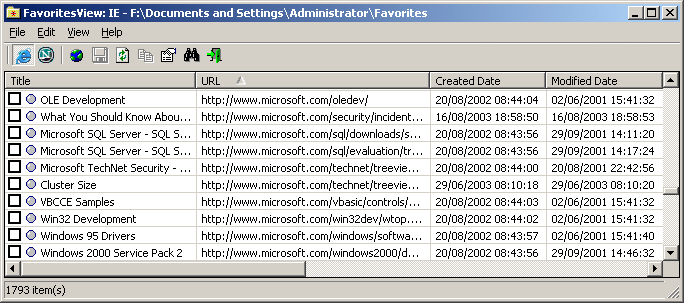
DescriptionFavoritesView displays the list of all your Favorties (of Internet Explorer browser) and bookmarks (of Netscape/Mozilla browsers) in a single page. Each line in the list specifies the title of the item, the URL address, the created/modified date of the bookmark item, and the folder name. You select one or more of these bookmarks, and then copy them to the clipboard, delete them (Only for Internet Explorer Favorites), export them to tab-delimited text file, HTML file, or XML file. FavoritesView also allows you to locate duplicate URL addresses in your Favorites/Bookmarks or find specific item by specifying the URL or the title.
Versions History
Using FavoritesViewFavoritesView is a standalone executable, so it doesn't require any installation process or additional DLLs. Simply extract the files to any folder you like, and run the executable - faview.exeYou can also use ZipInstaller to install FavoritesView. ZipInstaller automatically extracts all files from the Zip file, creates a folder for the software, adds shortcuts to the desktop and to the start menu, and adds an entry to the Add/Remove module.
After running FavoritesView, the main window of FavoritesView displays the list of all your Favorites.
You can switch between IE Favorites and Netscape/Mozilla bookmarks by selecting the desired browser from the View menu, or by using the toolbar.
Notice: If you want to view the Bookmarks of Firefox 3, you must close all its windows, and only then use FavoritesView. When Firefox 3 is opened, it also locks the places.sqlite file, and thus FavoritesView cannot read it.
Command-Line Options
Translating FavoritesView To Another LanguageFavoritesView allows you to easily translate all menus, dialog-boxes, and other strings to other languages.In order to do that, follow the instructions below:
LicenseThis utility is released as freeware. You are allowed to freely distribute this utility via floppy disk, CD-ROM, Internet, or in any other way, as long as you don't charge anything for this. If you distribute this utility, you must include all files in the distribution package, without any modification !
DisclaimerThe software is provided "AS IS" without any warranty, either expressed or implied, including, but not limited to, the implied warranties of merchantability and fitness for a particular purpose. The author will not be liable for any special, incidental, consequential or indirect damages due to loss of data or any other reason.
FeedbackIf you have any problem, suggestion, comment, or you found a bug in my utility, you can send a message to nirsofer@yahoo.com
FavoritesView is also available in other languages. In order to change the language of FavoritesView, download the appropriate language zip file, extract the 'faview_lng.ini', and put it in the same folder that you Installed FavoritesView utility.
|
||||||||||||||||||||||||||||||||||||||||||||||||||||||||||||||||||||||||||||||||||||||||||||||||||||||