| |
| Main Page |
| Blog |
| Search |
| FAQ |
| TOP 10 |
| Pad Files |
| Contact |
| About... |
| Donate |
| All Utilities |
| Password Tools |
| System Tools |
| Browser Tools |
| Programmer Tools |
| Network Tools |
| Outlook/Office |
| 64-bit Download |
| Panel |
| Forensics |
| Pre-Release Tools |
| Articles |
Related Links
DescriptionLSASecretsView is a small utility that displays the list of all LSA secrets stored in the Registry on your computer.The LSA secrets key is located under HKEY_LOCAL_MACHINE\Security\Policy\Secrets and may contain your RAS/VPN passwords, Autologon password, and other system passwords/keys.
Versions History
LicenseThis utility is released as freeware. You are allowed to freely distribute this utility via floppy disk, CD-ROM, Internet, or in any other way, as long as you don't charge anything for this. If you distribute this utility, you must include all files in the distribution package, without any modification !
DisclaimerThe software is provided "AS IS" without any warranty, either expressed or implied, including, but not limited to, the implied warranties of merchantability and fitness for a particular purpose. The author will not be liable for any special, incidental, consequential or indirect damages due to loss of data or any other reason.
Known ProblemsFalse Alert Problems: Some Antivirus programs detect this utility as infected with Trojan/Virus.
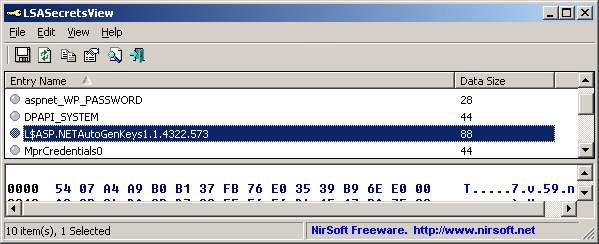
Using LSASecretsViewLSASecretsView doesn't require any installation process or additional DLLs. Just copy the executable file (LSASecretsView.exe) to any folder you like, and run it.The main window of LSASecretsView contains 2 panes: The upper pane displays the list of all LSA secret entries. When you select one or more items in the upper pane, the lower pane displays the LSA data of the selected items, in Hex and Ascii formats.
Reading LSA secrets from external instance of WindowsStarting from version 1.20, LSASecretsView allows you to read the LSA secrets from external instance of Windows. This feature can be useful if you have a dead system that cannot boot anymore. You can use this feature from the user-interface, by using the 'Advanced Options' in the File menu, or from command-line, by using /external parameter, for example:LSASecretsView.exe /external g:\windows
System RequirementThis utility works on 2000/XP/2003/2008/Vista/7/8/10. Windows 98/ME is not supported.
Translating LSASecretsView to other languagesIn order to translate LSASecretsView to other language, follow the instructions below:
FeedbackIf you have any problem, suggestion, comment, or you found a bug in my utility, you can send a message to nirsofer@yahoo.com
LSASecretsView is also available in other languages. In order to change the language of LSASecretsView, download the appropriate language zip file, extract the 'lsasecretsview_lng.ini', and put it in the same folder that you Installed LSASecretsView utility.
|
|||||||||||||||||||||||||||||||||||||||||||||||||||||||||||||||||||||||||||||||||||||||||||||||||||||||