| |

| RouterPassView v1.90 - Recover lost password from router backup file
Copyright (c) 2010 - 2020 Nir Sofer
|
See Also
Description
Most modern routers allow you to backup the configuration of the router into a file,
and then restore the configuration from the file when it's needed.
The backup file of the router usually contains important data like your ISP user name/password,
the login password of the router, and wireless network keys.
If you lost one of these password/keys, but you still have a backup file of your router
configuration, RouterPassView might help you to recover your lost password from your router file.
System Requirements
- This utility works on any version of Windows, starting from Windows 2000 and up to Windows 10.
- RouterPassView supports limited number of router models. See below.
Download links are on the bottom of this page
Versions History
- Version 1.90:
- Added new display mode: 'Router File Information' (F6). When you choose this display mode, RouterPassView displays additional information about how the file is encrypted, including File Type, Encrypted Data Start Position,
Encryption Algorithm, Encryption Key, Encryption IV, Compression. Be aware that encryption and compression information is displayed only for routers that use standard encryption/compression algorithms.
- This feature might be useful for people with programming knowledge who want to "play" with encrypting and decrypting the router file.
- Version 1.88:
- Fixed bug with file of NETGEAR R7000 - RouterPassView displayed only small part of the file.
- Version 1.87:
- RouterPassView now decrypts the encrypted strings in some of the Huawei HGxxx routers.
- Added support for Speedport-W724V.
- Added support for Huawei HG655d
- Version 1.86:
- Added support for Huawei HG531s V1.
- Version 1.85:
- Added support for Huawei HG531/HG532/HG658 routers and possibly other Huawei routers.
- Version 1.81:
- Fixed bug with decompressing some of the TP-Link Archer files.
- Version 1.80:
- Added support for ZTE models with AES encryption that use the serial number as encryption key (Like ZXHN H298A).
You have to type the serial number in the Advanced Options window (F9).
- Version 1.75:
- Added support for multiple ZTE models with AES encryption, including H108N, H118N, H267N, H298N, H168N, and possibly more...
- Version 1.72:
- When RouterPassView manages to detect a router file and decrypt it, the file type code is now displayed in the bottom status bar
(See the 'Detected File Type' section for more information)
- Version 1.71:
- Added support for TP-LINK TL-WR842N and Mercury MW325R (In Ascii Text Mode).
- Version 1.70:
- Added support for D-Link L7-N-R2000 (In Ascii Text Mode).
- Added support for D-Link DIR-615, DSL-2730U, and possibly other models (In Ascii Text Mode).
- Version 1.65:
- Fixed bug with some ZTE routers: RouterPassView decompressed only the first compressed block, so only a part of the file was displayed.
- Version 1.63:
- Fixed the Ascii Text Mode to display properly router files that contain many null characters.
- Version 1.62:
- Added support for another version of rom-0/Hdbgarea file format (Zyxel P-2612HWU-F1 Modem).
- Version 1.61:
- Added support for LevelOne WBR-3406TX v2 and possibly other routers (with DDC6031 and ZXL6031 signatures)
- Version 1.60:
- Added support for decompression of rom-0/Hdbgarea file format, which is used in multiple routers, including Huawei Echolife HG510a/HG520s/HG520b/HG520c, TP-LINK TD-W8901N, TP-LINK TD-8816, TP-LINK TD-W8901G, TP-LINK TD-W8951ND, TP-LINK TD-8817, SmartAX MT880a/MT880d/MT882a, Zyxel AMG1302,
and possibly others.
Be aware that in table mode, only the login password of the router is displayed, but you can find all other data if you switch to Hex Dump mode.
- Version 1.57:
- Added 'Export To Raw Decrypted File' option.
- Version 1.56:
- Added support for TP-LINK Archer D5 (Only in Ascii text mode).
- Version 1.55:
- Added support for TP-LINK Archer C2 (Only in Ascii text mode).
- Version 1.54:
- Added support for NETGEAR DEVG2020 (Only in Ascii text mode).
- Version 1.53:
- Added support for Linksys WRV200 (Base64 encoded file) - Hex Dump mode only.
- Version 1.52:
- Added support for ipTIME N604V (Hex Dump mode only)
- Version 1.51:
- Added support for NETGEAR WGR614v9, WNR1000v3, WNR3500L, and possibly other models.
- Version 1.50:
- Added support for routers that use zlib compression with 78DA header.
- Version 1.48:
- Added /RouterWeb command-line option, which opens the Web interface of the router in the default Web browser.
- Version 1.47:
- Added support for DD-WRT files (nvrambak.bin). You can view the entire file in name=value format, on Ascii text mode.
- Version 1.46:
- Added generic support for xml files with Base64 encoding, like in TP-Link TD-W8960N router.
- Version 1.45:
- Added generic support for simple XOR/Add encryption. (Works on HuaWei-3Com Aolynk BR104 and probably other routers)
- The Find dialog-box now also works on the text modes.
- Version 1.42:
- Added support for HuaWei HG526.
- The opened router filename is now displayed in the window title.
- Version 1.41:
- Added support for D-Link DIR-600 (Only in Ascii text mode)
- Version 1.40:
- Added support for D-Link DI-524 (firmware versions 2.x and 3.x), D-Link DI-624+A, and other
routers with DLB6061 / DLB6031 signature.
- Version 1.39:
- Fixed a bug with decryption of Asus routers (Asus RT-N10+, Asus RT-N56U, and others)
- Version 1.38:
- Added support for Asus RT-N10+ , and possibly other routers with the same encryption.
- Version 1.37:
- Added support for HuaWei EchoLife HG520 (In Ascii Text Mode), and possibly other routers with the same encryption.
- Version 1.36:
- Added support for D-Link DIR-615 G2.
- Version 1.35:
- Added support for TP-LINK TL-WR700N, advanced versions of TL-WR340G, and probably other TP-LINK routers.
- Version 1.33:
- Imporved (again) the detection of Edimax routers.
- Version 1.32:
- Added support for multiple TP-LINK routers, including
TL-WR841N, TL-WR841DN, TL-MR342, TL-WR340G, TL-R460, and probably other models.
- Version 1.31:
- Added support for decrypting the passwords of Linksys/Cisco RV042.
- Version 1.30:
- Imporved the detection of Edimax routers.
- Version 1.29:
- Added 'Open Router Web Interface' option (Ctrl+W), which allows you to easily open
the Web interface of your router with your default Web browser.
- Version 1.28:
- Added support for more NETGEAR router models.
- Version 1.27:
- Added generic support (in Hex Dump mode) for router files that are encrypted with XOR 0xff, like Thomson TG580 DSL.
- Version 1.26:
- Added 'Copy Password/Value' option to easily copy only the password or wireless key
into the clipboard.
- Version 1.25:
- Added support for D-Link DSL-604T and other models that their config file begins with LMMC signature.
- Added generic support for router files that are compressed with Deflate compression algorithm. (only on Ascii and Hex Dump modes)
- Version 1.20:
- Added /sascii command-line option - Save the decrypted router file as Ascii text file.
- Added /shex command-line option - Save the decrypted router file as hex-dump text file.
- Added /sraw command-line option - Save the decrypted router file as raw binary file.
- Version 1.16:
- Added support for other versions of Edimax router file - currently only in Hex Dump mode.
- When you open a file that RouterPassView can decrypt, but it cannot locate the exact passwords location,
it'll automatically switch to Hex Dump mode, so you'll be able to try locating the password in the decrypted Hex Dump.
- Version 1.15:
- Added command-line support.
- Fixed issue: Removed the wrong encoding from the xml string, which caused problems to some xml viewers.
- Version 1.10:
- Added 'Grab Password From IE Window' option - Allows you to open the router
configuration interface in Internet Explorer, and then grab the password stored inside the
password text-box of the router Web page.
- Version 1.05:
- Added support for D-Link DIR-300, and possibly similar models.
- Version 1.04:
- Added support for Sitecom WL-351, and possibly other models.
- Version 1.03:
- Fixed bug: user names of D-Link routers were wrong.
- Version 1.02:
- Added support for D-Link DIR-655, and possibly other models (with gateway_settings.gws filename)
- Added support for Sanex SA 5100, and possibly other models.
- Fixed bug: Copy to clipboard (Ctrl+C) was disabled in text mode.
- Version 1.01:
- Added support for Tomato firmware.
- Added the password of 'support' user for D-Link DSL-2540U and possibly other routers.
- Version 1.00 - First release.
Supported Routers
Due to large amount of router models available in the market, it's impossible to support all
of them.
For now, RouterPassView supports a limited number of router models, and I'll gradually
add support for more routers in future versions.
Also, be aware that even if your router is not in the list, you can still try to open
your router backup file with RouterPassView, because some routers are sold with
different brand name, but they still use the same software/chipset of other routers.
Here's the list:
- Linksys WRT54GL (With original firmware or Tomato firmware), WRT54G (only some of them), WRT160N, WRT320N, and possibly similar models.
- Linksys E5200
- Linksys E1200
- Linksys E2000
- Linksys RV082
- Linksys E2500
- Linksys N1500
- Linksys E900
- Cisco-Linksys E4200
- Cisco Linksys E1000 v2.1
- Edimax BR6204WG, and possibly similar models.
- Siemens ADSL SL2-141, and possibly similar models.
- Siemens CL-110 PSTN ADSL2+
- Dynalink RTA1025W, and possibly similar models.
- NETGEAR WGT624, WGR614v9, WNR1000v3, WNR3500L, and possibly other models.
- NETGEAR DEVG2020
- ASUS WL-520g, WL-600g, and possibly similar models.
- ASUS RT-N10+ , and possibly similar models.
- Asus RT-N56U , and possibly similar models.
- Asus RT-AC66U
- Asus RT-AC68U
- Asus RT-AC68W
- Asus RT-N66U
- Asus RT-N12+
- Asus DSL-N14U
- D-Link DIR-655, DIR-300, and possibly similar models.
- Sanex SA 5100, and possibly similar models.
- Sitecom WL-351, WL-575, WL-312, and possibly similar models.
- COMTREND 536+ (Only Internet Login)
- US Robotics 9108 ADSL (internet login and admin login)
- D-Link DSL-2540U/BRU/D ADSL2+, DSL-2650U, DSL-520B
- D-Link DVA-G3170i/PT
- D-Link DSL-604T
- D-Link G3670B
- D-Link DSL-2640T
- D-Link DSL-G684T
- D-Link DSL-2500U
- D-Link 2740B
- D-Link DIR-615 G2
- D-Link WBR-1310
- D-Link DSL-2543B
- D-Link DI-524
- D-Link DI-624+A
- D-Link DIR-600
- D-Link DIR-300
- D-Link DSL-2780
- D-Link DIR-605L
- D-Link DIR-865L
- D-Link DSL-2750U
- D-Link L7-N-R2000
- D-Link DIR-615
- D-Link DIR-859
- D-Link DSL-2730U
- D-Link DSL-2877AL
- TL-WDR4300 N750
- TP-Link TD-8810 ADSL Modem/Router.
- Dynamode R-ADSL-C4-W-G1
- NetComm NB5Plus4 DSL
- Thomson TG580 DSL (only in Hex Dump mode)
- Asus RT-G31
- HuaWei EchoLife HG520
- Huawei Echolife HG510a/HG520s/HG520b/HG520c
- HuaWei HG526
- HuaWei-3Com Aolynk BR104
- Huawei HG531
- Huawei HG532
- Huawei HG658
- Huawei HG655d
- Huawei HG633
- Vodafone HG659
- TP-LINK TL-WR841N
- TP-LINK TL-WR841DN
- TP-LINK TL-WR842N
- TP-LINK TL-MR342
- TP-LINK TL-WR340G
- TP-LINK TL-R460
- TP-LINK TL-WR741ND v2.0
- TP-LINK TL-WR700N
- TP-LINK TL-WR740N
- TP-LINK TL-WA801N
- TP-LINK TL-WR541G
- TP-LINK TL-WR1043ND
- TP-LINK TD-W8960N
- TP-Link TL-WR941ND
- TP-Link TL-MR3220
- TP-Link TL-WR642G
- TP-Link TL-WDR3320
- TP-Link TL-WDR3600
- TP-LINK TL-WR720N
- TP-Link TD-W8970
- TP-LINK TD-W8901N
- TP-LINK TD-8816
- TP-LINK TD-W8901G
- TP-LINK TD-W8951ND
- TP-LINK TD-8840
- TP-LINK TD-8817
- TP-LINK TD-W8968 V2
- TP-LINK TD-W9970
- TP-LINK TL-WR845N
- TP-LINK Archer C2
- TP-LINK Archer D5
- TP-LINK Archer D9
- TP-LINK Archer C9
- TP-LINK Archer C5
- TP-LINK Archer C7
- TP-LINK Archer MR200 AC750
- Belkin N+ (F5D8236uk4)
- Mercury MW54R
- Netgear AC5300 Nighthawk X8 (R8500)
- Netgear AC1750 Smart WiFi Router (R6300)
- Netgear Nighthawk AC1900 (R7000)
- Netgear N900 WiFi Dual Band Gigabit Router (WNDR4500)
- Netgear DG632
- Netgear Wireless Cable Voice Gateway CG3000/CG3100
- Netgear WNDR4000 (Rev 1)
- Netgear WNR2000v2
- Netgear V7610
- Netcomm NB6W
- Aztech DSL605EW
- Comtrend CT-5072T ADSL2+ modem/router
- Small Business RV042
- Intelbras WRN240
- ipTIME N604V
- Linksys WRV200
- Sagem F@ST2404
- ZTE ZXV10
- ZTE ZXHN H108N
- ZTE ZXHN H118N
- ZTE ZXHN H267N
- ZTE ZXHN H298N
- ZTE ZXHN H168N
- ZTE ZXHN F660
- ZTE ZXHN H298A
- ZTE ZXHN H267A V1.0
- ZTE H268A
- SmartAX MT880a/MT880d/MT882a
- Zyxel AMG1302
- Zyxel P-2612HWU-F1
- ZyXel NBG-418N
- Alcatel Lucent I-240W-A
- Alcatel Lucent G-240W-B
- LevelOne WBR-3406TX v2
- MSI RG54SE II
- Mercury MW325R
- SmartRG SR555AC
- Speedport W724V
If you have router model that is not listed here, and you managed to recover your password
with RouterPassView, please report about it to nirsofer@yahoo.com and specify the exact model name.
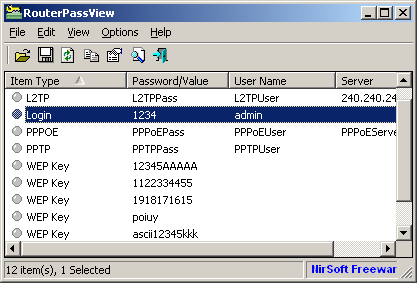
Using RouterPassView
RouterPassView doesn't require any installation process or additional DLL files.
In order to start using it, simply run the executable file - RouterPassView.exe
After running RouterPassView, you can open your router configuration file by using 'Open Router Config File'
option (Ctrl+O) or by dragging the config file from Explorer into the main window of RouterPassView.
If RouterPassView manage to detect and decrypt your router file, you should get a list of
passwords/wireless keys in the main window of RouterPassView. If RouterPassView cannot detect your file,
it'll remain empty.
Text Mode (Ascii and Hex Dump)
If RouterPassView shows you a list of passwords, but you can't find the password or other data that you need,
you may try to locate your password by switching to Ascii Text Mode (F3) or Hex Dump Text Mode (F4).
In these modes, RouterPassView decrypts the router file, but display it "as is" without
analyzing the data stored in it.
How to submit a config file
If you have a router config file that RouterPassView cannot decrypt and analyze,
you are welcomed to send the sample config file to nirsofer@yahoo.com, and I'll
try to figure out how to read it and add support for this file in future version.
Notice: In the recent years, many routers use 3DES or AES algoritm with secret encryption key stored inside the router's firmware.
In order to decrypt these files, the firmware of the router is needed, so if you have the firmware file or a link to download it, please
send it with the sample config file.
You can also increase the chance of my ability to detect the encryption of the config file, by sending 2
config files with a small change in the configuration.
Detected File Type
Starting from version 1.72, RouterPassView displays the detected file type in the bottom status bar.
Here's the list of all possible file types:
- 1 - Linksys WRTxxx routers
- 2 - Edimax routers with DS0 signature
- 3 - Siemens routers (File begins with <psitree> )
- 4 - Asus routers (HDR1 signature)
- 5 - Netgear unencrypted
- 6 - Tomato firmware
- 7 - Sanex routers
- 8 - D-Link routers (1)
- 9 - Sitecom routers
- 10 - D-Link routers (2)
- 11 - D-Link routers (3)
- 12 - Linksys routers (R31P Signature)
- 13 - Routers with LMMC Signature
- 14 - TP-Link Routers (1)
- 15 - TP-Link Routers (2)
- 16 - Simple encryption - add 0x80 to every byte
- 17 - Asus (RT-N10 and some other models)
- 18 - Routers with DLB/DDC/ZXL signature
- 19 - HuaWei HG526 and some similar models
- 20 - DD-WRT firmware
- 21 - Netgear DES Encryption
- 22 - Netgear file with 'encryptionnQP' signature
- 23 - TP-Link Routers (3)
- 24 - Routers with Hdbgarea signature (1)
- 25 - Routers with Hdbgarea signature (2)
- 26 - D-Link routers (4)
- 27 - D-Link routers (5)
- 28 - TP-Link Routers (4)
- 29 - ZTE AES Encryption (1)
- 30 - ZTE AES Encryption (2)
- 31 - Huawei HGxxx AES Encryption
- 100 - Generic gzip compression
- 101 - Generic deflate compression
- 102 - XOR with 0xff
- 103 - generic XOR
- 104 - generic add
- 105 - generic XML (unencrypted)
- 106 - Base64
Using the 'Grab Password From IE Window' option
If you try to recover your ISP/ADSL/L2TP/PPTP/PPPOE/DDNS password,
but RouterPassView cannot decrypt the configuration file of your router,
you still have a chance to retrieve the password by using this feature, assuming that you have the
login password of your router.
In order to use this feature, follow the instructions below.
- Login into your router Web interface with Internet Explorer, and go to the password page
that you wish to recover. This password page may look like this one:
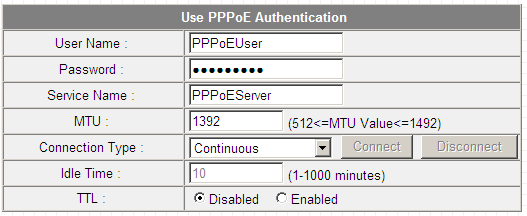
As you can see in the above screenshot, the password field is filled with bullets, but if this
password field really contains the password, RouterPassView will be able to extract it and display it on the main window.
- Go to the File menu, and choose 'Grab Password From IE Window' or simply press Ctrl+G
- If the router Web page store the password in the password field, RouterPassView will display
the hidden password:
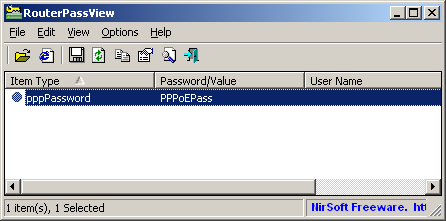
Be aware that some routers deliberately store wrong password in this field, and in for these routers,
RouterPassView won't be able to recover your real password.
Command-Line Options
|
/RouterFile <Filename>
|
Specifies the router file to load.
| |
/RouterWeb
|
Opens the Web interface of the router in the default Web browser.
| |
/stext <Filename>
| Save the list of router passwords into a regular text file.
| |
/stab <Filename>
| Save the list of router passwords into a tab-delimited text file.
| |
/scomma <Filename>
| Save the list of router passwords into a comma-delimited text file (csv).
| |
/stabular <Filename>
| Save the list of router passwords into a tabular text file.
| |
/shtml <Filename>
| Save the list of router passwords into HTML file (Horizontal).
| |
/sverhtml <Filename>
| Save the list of router passwords into HTML file (Vertical).
| |
/sxml <Filename>
| Save the list of router passwords into XML file.
| |
/sascii <Filename>
|
Save the decrypted router file as Ascii text file.
(Similar to the Ascii Text Mode)
| |
/shex <Filename>
|
Save the decrypted router file as hex-dump text file.
(Similar to the Hex-Dump Text Mode)
| |
/sraw <Filename>
|
Save the decrypted router file as raw binary file,
Which means that the file is decrypted and then saved 'as is' without any processing.
|
Translating RouterPassView to other languages
In order to translate RouterPassView to other language, follow the instructions below:
- Run RouterPassView with /savelangfile parameter:
RouterPassView.exe /savelangfile
A file named RouterPassView_lng.ini will be created in the folder of RouterPassView utility.
- Open the created language file in Notepad or in any other text editor.
- Translate all string entries to the desired language.
Optionally, you can also add your name and/or a link to your Web site.
(TranslatorName and TranslatorURL values) If you add this information, it'll be
used in the 'About' window.
- After you finish the translation, Run RouterPassView, and all translated
strings will be loaded from the language file.
If you want to run RouterPassView without the translation, simply rename the language file, or move
it to another folder.
License
This utility is released as freeware. You are allowed to freely use it at your home
or in your company. However, you are not allowed to make profit from this software or to
charge your customers for recovering their passwords with this software, unless you got a permission from the software author.
You are also allowed to freely distribute this utility via floppy disk, CD-ROM,
Internet, or in any other way, as long as you don't charge anything for this.
If you distribute this utility, you must include all files in
the distribution package, without any modification !
Disclaimer
The software is provided "AS IS" without any warranty, either expressed or implied,
including, but not limited to, the implied warranties of merchantability and fitness
for a particular purpose. The author will not be liable for any special, incidental,
consequential or indirect damages due to loss of data or any other reason.
Feedback
If you have any problem, suggestion, comment, or you found a bug in my utility,
you can send a message to nirsofer@yahoo.com
RouterPassView is also available in other languages. In order to change the language of
RouterPassView, download the appropriate language zip file, extract the 'routerpassview_lng.ini',
and put it in the same folder that you Installed RouterPassView utility.
|
|
