| |
| Main Page |
| Blog |
| Search |
| FAQ |
| TOP 10 |
| Pad Files |
| Contact |
| About... |
| Donate |
| All Utilities |
| Password Tools |
| System Tools |
| Browser Tools |
| Programmer Tools |
| Network Tools |
| Outlook/Office |
| 64-bit Download |
| Panel |
| Forensics |
| Pre-Release Tools |
| Articles |
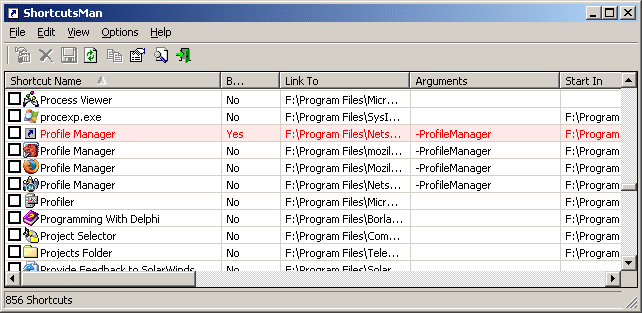
DescriptionShortcutsMan displays the details about all shortcuts that you have on your desktop and under your start menu. Broken shortcuts (shortcuts that point to file that doesn't exist) are automatically painted with pink color. You select one or more shortcuts, and then delete them, resolve them or save the shortcut's details to HTML/Text/XML file.
Versions History
System RequirementsYou can use this utility in all 32-bit Windows operating systems: Windows 9x/ME, Windows NT, Windows 2000, and Windows XP.
Using ShortcutsManShortcutsMan is a standalone program, so it doesn't require any installation or additional DLLs. In order to start using it, just copy the executable (shman.exe) to any folder you like, and run it.After running ShortcutsMan utility, wait until the shortcuts list is loaded. The main window of ShortcutsMan displays the list of all shortcuts that you have on your desktop and under your start menu. Broken shortcuts (shortcuts that point to file that doesn't exist) are automatically painted with pink color. You select one or more shortcuts, and then delete them, resolve them or save the shortcut's details to HTML/Text/XML file.
Resolving shortcutsWhen you find one or more broken shortcuts (shortcuts that point to file that doesn't exist), in your system, you can try to fix them by using the "Resolve Selected Shortcuts" option. If the filename was changed or moved to another folder, the resolving process will fix the shortcut so it'll point to a valid filename.
Command-Line Options
Examples:
Translating to other languagesShortcutsMan allows you to easily translate all menus, dialog-boxes, and other strings to other languages.In order to do that, follow the instructions below:
LicenseThis utility is released as freeware for personal and non-commercial use. You are allowed to freely distribute this utility via floppy disk, CD-ROM, Internet, or in any other way, as long as you don't charge anything for this. If you distribute this utility, you must include all files in the distribution package, without any modification !
DisclaimerThe software is provided "AS IS" without any warranty, either expressed or implied, including, but not limited to, the implied warranties of merchantability and fitness for a particular purpose. The author will not be liable for any special, incidental, consequential or indirect damages due to loss of data or any other reason.
FeedbackIf you have any problem, suggestion, comment, or you found a bug in my utility, you can send a message to nirsofer@yahoo.com
ShortcutsMan is also available in other languages. In order to change the language of ShortcutsMan, download the appropriate language zip file, extract the 'shman_lng.ini', and put it in the same folder that you Installed ShortcutsMan utility.
|
|||||||||||||||||||||||||||||||||||||||||||||||||||||||||||||||||||||||||||||||||||||||||||||||||||||||||||||||||||||||