|
|
|
|
| |

| UserProfilesView v1.10
Copyright (c) 2008 - 2015 Nir Sofer
|
Description
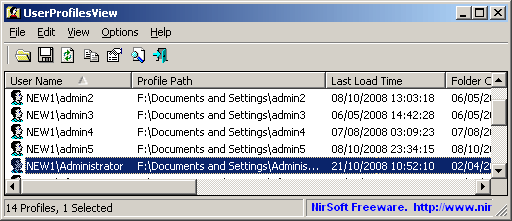
UserProfilesView displays the list of all user profiles that you currently have in your system.
For each user profile, the following information is displayed: Domain\User Name, Profile Path, Last Load Time,
Registry File Size, User SID, and more.
You can save the profiles list into text/xml/html/csv file.
Versions History
- Version 1.10
- Added 'Run As Administrator' option (Ctrl+F11)
- Added 'Registry Loaded' column (Yes/No), which specifies whether the Registry key of the user is loaded into HKEY_USERS key.
- Added 'Logon Time' column, which specifies the logon time of the current logged on user.
- UserProfilesView now displays the system users that it failed to get in previous versions.
- Version 1.01 - Added command-line options for sorting.
- Version 1.00 - First release.
System Requirements
This utility works with any version of Windows, starting from Windows 2000, and up to Windows 10.
Using UserProfilesView
UserProfilesView doesn't require any installation process or additional dll files.
In order to start using it, simply run the executable file - UserProfilesView.exe
After running it, the main window will display the all of all user profiles.
You can select one or more items, and then save the list into xml/html/csv/xml file.
Command-Line Options
|
/stext <Filename>
| Save the list of all profiles into a regular text file.
| |
/stab <Filename>
| Save the list of all profiles into a tab-delimited text file.
| |
/scomma <Filename>
| Save the list of all profiles into a comma-delimited text file.
| |
/stabular <Filename>
| Save the list of all profiles into a tabular text file.
| |
/shtml <Filename>
| Save the list of all profiles into HTML file (Horizontal).
| |
/sverhtml <Filename>
| Save the list of all profiles into HTML file (Vertical).
| |
/sxml <Filename>
| Save the list of all profiles to XML file.
| |
/sort <column>
|
This command-line option can be used with other save options for sorting by the desired column.
If you don't specify this option, the list is sorted according to the last sort that you made from the user interface.
The <column> parameter can specify the column index (0 for the first column, 1 for the second column, and so on) or
the name of the column, like "Profile Path" and "User Name".
You can specify the '~' prefix character (e.g: "~Last Load Time") if you want to sort in descending order.
You can put multiple /sort in the command-line if you want to sort by multiple columns.
Examples:
UserProfilesView.exe.exe /shtml "f:\temp\profiles.html" /sort 2 /sort ~1
UserProfilesView.exe.exe /shtml "f:\temp\profiles.html" /sort "User Name"
| |
/nosort
|
When you specify this command-line option, the list will be saved without any sorting.
|
Translating UserProfilesView to other languages
In order to translate UserProfilesView to other language, follow the instructions below:
- Run UserProfilesView with /savelangfile parameter:
UserProfilesView.exe /savelangfile
A file named UserProfilesView_lng.ini will be created in the folder of UserProfilesView utility.
- Open the created language file in Notepad or in any other text editor.
- Translate all string entries to the desired language.
Optionally, you can also add your name and/or a link to your Web site.
(TranslatorName and TranslatorURL values) If you add this information, it'll be
used in the 'About' window.
- After you finish the translation, Run UserProfilesView, and all translated
strings will be loaded from the language file.
If you want to run UserProfilesView without the translation, simply rename the language file, or move
it to another folder.
License
This utility is released as freeware.
You are allowed to freely distribute this utility via floppy disk, CD-ROM,
Internet, or in any other way, as long as you don't charge anything for this.
If you distribute this utility, you must include all files in
the distribution package, without any modification !
Disclaimer
The software is provided "AS IS" without any warranty, either expressed or implied,
including, but not limited to, the implied warranties of merchantability and fitness
for a particular purpose. The author will not be liable for any special, incidental,
consequential or indirect damages due to loss of data or any other reason.
Feedback
If you have any problem, suggestion, comment, or you found a bug in my utility,
you can send a message to nirsofer@yahoo.com
UserProfilesView is also available in other languages. In order to change the language of
UserProfilesView, download the appropriate language zip file, extract the 'userprofilesview_lng.ini',
and put it in the same folder that you Installed UserProfilesView utility.
|
|
|
