| |

| MZHistoryView v1.70 - History Viewer for Mozilla / Firefox Browsers
Copyright (c) 2007 - 2021 Nir Sofer
|
See Also
Description
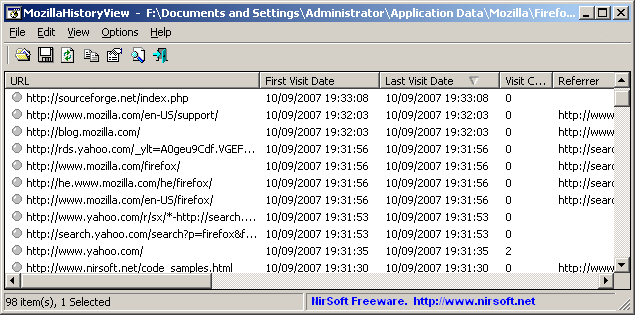
MZHistoryView is a small utility that reads the history data file (places.sqlite or history.dat)
of Firefox/Mozilla/Netscape Web browsers, and displays the list of all visited Web pages
in the last days.
For each visited Web page, the following information is displayed:
URL, First visit date, Last visit date, Visit counter, Referrer, Title, and Host name.
You can also easily export the history data to text/HTML/Xml file.
Notice:
The name of this tool was changed from MozillaHistoryView to MZHistoryView due to the obsession of Mozilla Foundation people with their registered trademark.
I have received a threatening letter from the attorney of Mozilla Foundation saying that using the 'Mozilla' word inside the name of my software infringes their trademark rights
and demanding that I'll change the name of this tool.
In order to avoid from any trouble in the future, I decided to change the name of this tool to MZHistoryView.
Search for other utilities in NirSoft
System Requirements
This utility works on any version of Windows, From Windows 98 to Windows 11.
Versions History
- Version 1.70:
- MZHistoryView now reads the history database of Firefox directly without using the SQLite library from the install folder of Firefox.
It means that you can now use this tool even if Firefox is not installed on your system, as long as you have the places.sqlite database file.
- You can now send the data to stdout by specifying empty string as filename, for example:
MZHistoryView.exe /scomma "" | more
- Version 1.65:
- Added 'Quick Filter' feature (View -> Use Quick Filter or Ctrl+Q). When it's turned on, you can type a string in the text-box added under the toolbar and MZHistoryView will instantly filter the browsing history, showing only lines that contain the string you typed.
- Version 1.62:
- Added 64-bit version for Firefox 64-bit.
- Version 1.61:
- Added 'Auto Size Columns+Headers' option.
- Version 1.60:
- Added 'Frecency' column. You can find explanation about the value of this field in this Web page.
- Version 1.57:
- Fixed the DLL loading problem on Windows XP/2003.
- Version 1.56:
- MozillaHistoryView now detects the portable version of Firefox if it's running in the background.
- Version 1.55:
- Added 'URL Length' column.
- Version 1.53:
- Fixed to display local date/time values according to daylight saving time settings.
- Version 1.52:
- Fixed a bug with displaying IDN URLs (URLs containing non-English characters).
- Version 1.51:
- Fixed to work with Firefox 22.
- Version 1.50:
- Added Stop menu, which allows you to stop the loading process of the Firefox history.
- When the 'Merge multiple items with identical URLs into one item' is turned on - The 'First Visit Date' is displayed even if there is only a single visit (In previous versions it remained empty).
- Version 1.45:
- Added option to choose the correct installation folder of Firefox (In the 'Select History Filename' window), for using when MozillaHistoryView cannot detect the Firefox installation properly.
- Added /UseFirefoxFolder and /FirefoxFolder command-line options.
- Version 1.44:
- The selected time range is now saved in the .cfg file.
- Version 1.43:
- Increased the size of the time range controls, to allow the user to choose AM or PM more easily, when AM/PM time format is defined in the language settings of Windows.
- Version 1.42:
- Added option to load only URLs with the specified title string.
- Version 1.41:
- Added new option in the Select History Filename window: 'Merge multiple items with identical URLs into one item'.
- Version 1.40:
- Added option to filter the URLs according to their visit count.
- Version 1.35:
- Added option to load only the URLs contain the specified strings (comma-delimited list).
You can use this feature to view only the history of the desired Web sites.
- Added option to filter out the URLs contain the specified strings (comma-delimited list).
- Version 1.31:
- Fixed the memory leak problem on every refresh.
- Added support for Firefox 4 (Beta).
- Version 1.30:
- Added option to specify the date/time range of the browsing history that you want to view.
- Reduced the memory usage when loading large number of history items.
- Version 1.27:
- Fixed issue: MozillaHistoryView displayed the Advanced Options dialog-box when using -file command-line option.
- Added /UseVisitTimeFilter and /VisitTimeFilter command-line options.
- Version 1.26:
- Added 'Add Header Line To CSV/Tab-Delimited File' option. When this option is turned on, the column names are added
as the first line when you export to csv or tab-delimited file.
- Version 1.25:
- Added option to load only the history items in the last xx days. This option can be useful if the loading process of the history file is very slow, and you want to view only the history of the last few days.
- Added 'Choose History File On Start' option. When this option is turned on, MozillaHistoryView will ask you to choose the
history file before loading it.
- Version 1.20:
- Added command-line options for sorting.
- Version 1.18:
- Added AutoComplete to the history filename combo-box.
- Version 1.17:
- MozillaHistoryView now detects any file with .sqlite extension as Firefox 3 filename.
- Version 1.16:
- Improved the Firefox 3 detection.
- Display an error message when MozillaHistoryView failed to find the dll of SQLite database.
- Version 1.15:
- Fixed bug: MozillaHistoryView failed to open the history file of Firefox 3 (places.sqlite) when the browser was opened.
- The 'Select History Filename' dialog-box is now resizable.
- Version 1.14 - Fixed bug: MozillaHistoryView failed to work with Firefox 3.0.1
- Version 1.13 - Fixed bug: Long URL were corrupted.
- Version 1.12 - Decreased exe file size and added links in HTML report.
- Version 1.11 - Added .sqlite filter to select file dialog-box.
- Version 1.10 - Added support for Firefox 3.0 (places.sqlite file)
- Version 1.05 - Fixed the text-length limit problem in the history file combo-box.
- Version 1.04 - Fixed bug: The main window lost the focus when the user switched to another application and then returned back to MozillaHistoryView.
- Version 1.03 - Added support for saving as comma-delimited text file.
- Version 1.02 - Fixed bug: MozillaHistoryView failed to read history files that had one or more URLs with '(' character.
- Version 1.01 - Fixed bug: MozillaHistoryView failed to read some history files.
- Version 1.00 - First Release.
Using MZHistoryView
MZHistoryView doesn't require any installation process or additional DLL files.
Just copy the executable file (MozillaHistoryView.exe) to any folder you like, and run it.
After you run it, the main window displays the list of visited Web pages loaded from
the history.dat of the Mozilla/Firefox profile that you used in the last time.
If you want to view the content of another history file, simply use the 'Select History File' option (Ctrl + H), or
drag the history.dat filename from Explorer into the main window of MZHistoryView.
You can select one or more history items, and then export the list into text/HTML/Xml file ('Save Selected Items' option).
You can also copy the selected items to the clipboard, and then paste them to Excel or to OpenOffice spreadsheet.
Command-Line Options
|
/stext <Filename>
| Save the list of all visited Web sites into a regular text file.
| |
/stab <Filename>
| Save the list of all visited Web sites into a tab-delimited text file.
| |
/scomma <Filename>
| Save the list of all visited Web sites into a comma-delimited text file.
| |
/stabular <Filename>
| Save the list of all visited Web sites into a tabular text file.
| |
/shtml <Filename>
| Save the list of all visited Web sites into HTML file (Horizontal).
| |
/sverhtml <Filename>
| Save the list of all visited Web sites into HTML file (Vertical).
| |
/sxml <Filename>
| Save the list of all visited Web sites to XML file.
| |
/sort <column>
|
This command-line option can be used with other save options for sorting by the desired column.
If you don't specify this option, the list is sorted according to the last sort that you made from the user interface.
The <column> parameter can specify the column index (0 for the first column, 1 for the second column, and so on) or
the name of the column, like "URL" and "Last Visit Date".
You can specify the '~' prefix character (e.g: "~Last Visit Date") if you want to sort in descending order.
You can put multiple /sort in the command-line if you want to sort by multiple columns.
Examples:
MozillaHistoryView.exe /shtml "f:\temp\history.html" /sort 2 /sort ~1
MozillaHistoryView.exe /shtml "f:\temp\history.html" /sort "Last Visit Date"
| |
/nosort
|
When you specify this command-line option, the list will be saved without any sorting.
| |
-file <History Filename>
|
Start MozillaHistoryView with the specified history.dat filename.
| |
/UseVisitTimeFilter <0 | 1>
|
Specifies whether you want to filter the history items according to the date/time.
0 = No, 1 = Yes
| |
/VisitTimeFilter <Number of days>
|
Specifies the last number of days of history to load. (When UseVisitTimeFilter = yes)
|
Examples:
MozillaHistoryView.exe -file "C:\Users\user01\AppData\Roaming\Mozilla\Firefox\Profiles\adpcsyds.default\places.sqlite"
MozillaHistoryView.exe -file "C:\Users\user01\AppData\Roaming\Mozilla\Firefox\Profiles\adpcsyds.default\places.sqlite" /shtml c:\temp\mz.html
MozillaHistoryView.exe /stext c:\temp\mz.txt
Translating MZHistoryView to other languages
In order to translate MZHistoryView to other language, follow the instructions below:
- Run MZHistoryView with /savelangfile parameter:
MozillaHistoryView.exe /savelangfile
A file named MozillaHistoryView_lng.ini will be created in the folder of MozillaHistoryView utility.
- Open the created language file in Notepad or in any other text editor.
- Translate all string entries to the desired language.
Optionally, you can also add your name and/or a link to your Web site.
(TranslatorName and TranslatorURL values) If you add this information, it'll be
used in the 'About' window.
- After you finish the translation, Run MZHistoryView, and all translated
strings will be loaded from the language file.
If you want to run MZHistoryView without the translation, simply rename the language file, or move
it to another folder.
License
This utility is released as freeware.
You are allowed to freely distribute this utility via floppy disk, CD-ROM,
Internet, or in any other way, as long as you don't charge anything for this.
If you distribute this utility, you must include all files in
the distribution package, without any modification !
Disclaimer
The software is provided "AS IS" without any warranty, either expressed or implied,
including, but not limited to, the implied warranties of merchantability and fitness
for a particular purpose. The author will not be liable for any special, incidental,
consequential or indirect damages due to loss of data or any other reason.
Feedback
If you have any problem, suggestion, comment, or you found a bug in my utility,
you can send a message to nirsofer@yahoo.com
MozillaHistoryView is also available in other languages. In order to change the language of
MozillaHistoryView, download the appropriate language zip file, extract the 'mozillahistoryview_lng.ini',
and put it in the same folder that you Installed MozillaHistoryView utility.
|
|
