| |

| VideoCacheView v3.11
Copyright (c) 2007 - 2025 Nir Sofer
|
Related Utilities
- Replay Capture Suite - Capture any video/audio stream and convert it to to 36 popular formats.
- InstalledCodec - Displays the list of all Codec drivers currently installed on your system, and allows to disable unwanted Codec drivers.
Description
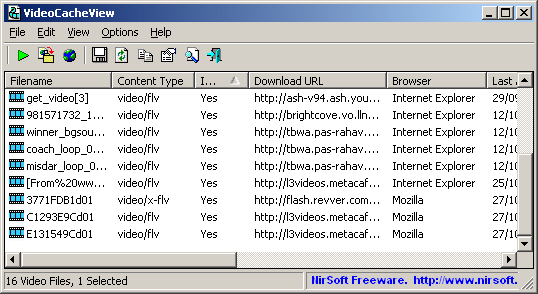
After watching a video in a Web site, you may want to save the video file into your local disk for playing it offline in the future.
If the video file is stored in your browser's cache, this utility can help you to extract the video file from the cache and save it for watching it in the future.
It automatically scans the entire cache of Internet Explorer, Mozilla-based Web browsers (Including Firefox), Opera, and Chrome, and then finds
all video files that are currently stored in it.
It allows you to easily copy the cached video files into another folder for playing/watching them in the future.
If you have a movie player that is configured to play flv files, it also allows you to play the video directly from your browser's cache.
Notice for users of Internet Explorer 10.0 and 11.0: In order to get videos from these versions of IE, you have to press F6 (Advanced Options) and
choose the 'Internet Explorer 10 Cache' option in the 'Load video files...' section.
Download links are on the bottom of this page
Versions History
- Version 3.11
- Updated to read the modified cache structure in the new versions of Chrome (Version 132).
- Version 3.10
- Updated to read the modified cache structure in the new versions of Chrome.
- Version 3.09
- Updated to read the Cache_Data subfolder in the new version of Chrome Web browser.
- Version 3.08
- Updated to work properly with the cache partitioning string on the latest versions of Chrome.
- Version 3.07
- Fixed to extract the URLs correctly from the latest versions of Firefox.
- Version 3.06
- Updated to work properly with the new cache partitioning of Chrome. (In previous versions, URL was displayed with _dk_ prefix).
- Version 3.05
- Added 'Manually Merge Selected Files' option (Ctrl+M). If you have split video files that VideoCacheView cannot detect and merge automatically,
you can select all items, press Ctrl+M and then VideoCacheView will merge all selected items into one.
- After using the 'Manually Merge Selected Files' option, you can use the 'Copy Selected Files To...' option to generate the merged file.
Be aware that the order of the merged files is determined according to the created time of every file.
- Version 3.00
- Added support for the new 'Simple Cache for HTTP' cache format of Chrome Web browser.
- Version 2.98
- Fixed to detect and merge the current video links of YouTube. Also, fixed a bug that caused VideoCacheView to include text or xml file related to the video stream inside the merged file,
causing the merged file to be corrupted.
- See the 'YouTube Videos' section for more information about working with YouTube files.
- Version 2.97
- Fixed bug: VideoCacheView failed to extract mp4 files with mms links on IE10/IE11.
- Version 2.96
- Fixed bug: VideoCacheView 32-bit failed to read the cache of IE11 on 64-bit systems.
- Version 2.95
- VideoCacheView now automatically detects the cache folder and termporary files of Yandex Web browser. (Be aware that Yandex is based on Chrome Web browser, so 'Chrome' is displayed in the browser column)
- Version 2.91
- When using the 'Open Selected File With', the 'Always use the selected program to open this kind of file' check-box is now turned off and disabled.
- Version 2.90
- VideoCacheView now detects automatically the temporary flash files of Microsoft Edge/Project Spartan (On Windows 10).
- Version 2.88
- When GPAC fails to merge video and audio files into one, VideoCacheView now displays an error message.
- Version 2.87
- Fixed to work with the latest build of Windows 10.
- Version 2.86
- Fixed issue: On some systems, VideoCacheView failed to read the cache of IE10/IE11 from WebCacheV01.dat
- Version 2.85
- Added option to scan only files from the last xx hours.
- Version 2.82
- Fixed VideoCacheView to detect the files inside Pepper Data\Shockwave Flash folder when specifying it as temporary folder in the 'Advanced Options' window.
- Version 2.81
- Fixed bug: VideoCacheView failed to retrieve some of the long URLs of Chrome Web browser (and without the URLs, VideoCacheView also failed to merge split video files).
- Version 2.80
- VideoCacheView now automatically detects and loads the cache of Opera 15 or later (Stored under C:\Users\[User Profile]\AppData\Local\Opera Software\Opera Stable\Cache).
Be aware that Opera is now based on Chrome Web browser, and thus VideoCacheView detects the cache files of Opera as Chrome...
- Version 2.77
- Fixed bug: VideoCacheView failed to remember the last size/position of the main window if it's not located in the primary monitor.
- Version 2.76
- VideoCacheView now automatically locates the temporary pepper flash folders of all Chrome and Chrome Canary profiles.
- Version 2.75
- Added support for the new cache structure of Firefox 32.
- Version 2.70
- VideoCacheView now automatically reads the cache of all profiles of Chrome and Firefox Web browsers.
- VideoCacheView now automatically detects the cache of Chrome Canary and SeaMonkey Web browsers.
- VideoCacheView now automatically reads the 'Media Cache' folder of Chrome Web browsers.
- VideoCacheView now automatically reads the temporary files stored under mozilla-temp-files folder.
- Version 2.68
- Added secondary sorting support: You can now get a secondary sorting, by holding down the shift key while clicking the column header. Be aware that you only have to hold down the shift key when clicking the second/third/fourth column. To sort the first column you should not hold down the Shift key.
- Version 2.67
- Fixed the 'Automatic File Size Refresh' problem on Windows 7/8.
- Version 2.66
- Fixed a crash problem occurred when trying to load the cache of IE10.
- Version 2.65
- Fixed VideoCacheView to detect YouTube videos from googlevideo.com domain.
- Version 2.63
- Fixed bug: VideoCacheView added YouTube split files with zero file-size, which sometimes caused the generated merged file to be corrupted.
- Version 2.62
- Added /cfg command-line option, which instructs VideoCacheView to use a config file in another location instead if the default config file, for example:
VideoCacheView.exe /cfg "%AppData%\VideoCacheView.cfg"
- Version 2.61
- For YouTube videos, VideoCacheView now displays your IP address at the time that you watched the video (The IP address is extracted from the URL)
- Version 2.60
- Added support for saving the new MPEG-DASH streams of YouTube as MP4 file that can be played on any media player. Requires to install
additional open-source software: GPAC.
VideoCacheView uses the MP4Box utility installed as a part of GPAC package to convert the MPEG-DASH streams into a valid mp4 file that can be played
with any media player. Special thanks to one of NirSoft users who gave me the hint for solving the problem with MPEG-DASH streams.
- Fixed bug with the cache of Internet Explorer (6.0 - 9.0): VideoCacheView failed to detect a small portion of the cache entries.
- Fixed VideoCacheView 32-bit to work with IE10 on 64-bit systems.
- Version 2.55
- Added option to save and load the entire configuration of VideoCacheView ('Save Configuration' and 'Load Configuration' under the File menu).
- Version 2.52
- Fixed issue with Chrome Web browser:
VideoCacheView loaded only 4 data files: data_0, data_1, data_2, data_3.
It seems that when the cache of Chrome is large enough, it starts to create more cache data files (data_4, data_5...)
Starting from this version, VideoCacheView will read these additional cache data files.
- Added support for merging the new MPEG-DASH streams of YouTube into one file.
Unfortunately, this feature is currently useless, because I cannot find any
video player that can actually play this kind of files...
- Version 2.51
- Fixed bug: VideoCacheView failed to detect some of the video files on IE10.
- Version 2.50
- Added limited support for Internet Explorer 10... and there are some problems with it:
- Many videos are not saved properly in the cache by IE10, and thus VideoCacheView will not be able to extract them.
- In order to ensure that all cache data of IE10 is saved to the disk, it's highly recommended to log off and then log on again, before using VideoCacheView
with IE10. If you don't do that, VideoCacheView may hang or crash...
- By default, IE10 feature is turned off. In order to start using it, go to 'Advanced Options' window (F6) and check the 'Internet Explorer 10 Cache' option.
- Version 2.46
- Added option to choose the file size display unit: Bytes, KB, or MB.
- Version 2.45
- Added support for split video files of dailymotion.com
Be aware that the merged .flv file created from dailymotion.com is not played properly by some FLV players.
In order to play this kind of file, you can try to use the latest version of VLC Media Player.
VLC Media Player has the ability to play the entire merged .flv file, though it initially detects only the first fragment.
- Version 2.40
- Added 'Use the Web page title as filename' option in the Copy Video Files dialog-box.
If this option is turned on, VideoCacheView will use the Web page title (As appears under the 'Title' column) to
generate the video filename.
- Version 2.38
- Fixed issue: On some systems, VideoCacheView saved .mp4 files without a file extension.
- Version 2.37
- Fixed bug: VideoCacheView crashed on some systems while reading the cache files of Firefox.
- Added 'Auto Size Columns+Headers' option, which allows you to automatically resize the columns according to the row values and column headers.
- Fixed issue: Dialog-boxes opened in the wrong monitor, on multi-monitors system.
- Version 2.36
- The string of the Title column is now automatically copied to the file description in the 'Copy Video Files' window.
- Version 2.35
- Added support for the new location of the Flash temporary files on Chrome Web browser (Google\Chrome\User Data\Default\Pepper Data\Shockwave Flash)
- Version 2.32
- Added x64 build, which allows you to extract temporary flash files from 64-bit Web browsers.
- Version 2.31
- Fixed bug: VideoCacheView failed to detect the temporary flash files if the system had large amount of running processes.
- Version 2.30
- Added 'Title' column, which displays the title of the Web page that was loaded while playing the video/audio file.
(Be aware that this feature is not perfect, and it may not work properly with some Web sites)
- Version 2.26
- Update for Firefox 13.x with Flash version 11.3.300.257:
The temporary flash files are now also taken from acro_rd_dir subfolder under the main temp folder,
as well as VideoCacheView can detect the executable file of Flash.
- Version 2.25
- VideoCacheView now can detect the flash temporary files of any Web browser installed on your system automatically.
- Version 2.22
- Fixed bug with split video feature: When switching to another video resolution, VideoCacheView merged
the split video of the original resolution with the full video file of the new resolution.
- Version 2.21
- VideoCacheView now also reads the turbo subfolder located under the main cache folder of Opera Web browser.
- Version 2.20
- Added support for the split video files of YouTube Web site.
After the scanning and loading process of the video files list is finished, VideoCacheView
automatically detects the .flv video files split by YouTube Web site, and displays every chunk of split files as a single record.
- The new 'split Files Count' column displays the number of split files that the displayed record represents.
- When you use the 'Copy Selected Files To...' option, VideoCacheView automatically merges all split files into one
.flv that can be played in .flv player. The files are merged in the order of the created date/time of every file.
- When you choose to delete a record containing split video files, all split files are deleted at once.
- Version 2.16
- Fixed VideoCacheView to detect the correct cache folder of Firefox if the user changed it from Firefox config (browser.cache.disk.parent_directory).
- Version 2.15
- Added option to display only files larger than the specified size (In 'Advanced Options' window)
- Version 2.10
- Added 'Start As Hidden' option. When this option and 'Put Icon On Tray' option are turned on, the main window of VideoCacheView will be invisible on start.
- Version 2.05
- Added 'Mark Non-Cached Files' option.
- Version 2.02
- Fixed bug: while scanning, non-cached video files displayed on the main window, even if 'Show Non-Cached Files' option was turned off.
- Version 2.01
- Fixed a problem with temporary flv files of Safari Web browser.
- Version 2.00
- Added 'Explorer Copy' option, which allows you to copy the video filename to the clipboard and then
paste it into a folder of Windows Explorer. Be aware that this feature doesn't work properly with temporary .flv files,
because Windows Explorer cannot copy locked files.
- You can also drag a video file from VideoCacheView into a folder of Windows Explorer or any other software
that supports drag & drop of files.
- Version 1.98
- Fixed bug: When using invalid filename characters on the 'File description to generate the filename' field,
the copy video files action was failed. Invalid filename characters are now replaced with '-' character.
- Version 1.97
- Fixed bug: The 'Open VideoCacheView' menu item of the tray icon didn't work.
- Version 1.96
- Fixed the column labels on the 'Choose Process' window.
- Added 2 accelerator keys.
- Version 1.95
- Added 'Put Icon On Tray' option.
- Version 1.94
- The title of the top web browser window is now
automatically copied as the default filename in the 'Copy Video Files To...' window.
- Version 1.93
- Added 'Mark Odd/Even Rows' option, under the View menu. When it's turned on, the odd and even rows are displayed in different color, to make it easier to read a single line.
- Version 1.92
- VideoCacheView now displays the copied filename in the bottom status bar,
when using the 'Copy Video Files To...' option.
- Version 1.91
- The 'Copy Video Files To...' window now allows you specify a description text for the video file.
This description text will be used to create a good readable filename, instead of creating meaningless filename, like 'flaCC69.flv'.
For example: If you specify 'Great YouTube Video' as the description text, the video filename will be
Great YouTube Video.flv
If this filename already exists and 'Copy as new name if filename already exists' option is checked,
a counter will be added to the filename (For example: 'Great YouTube Video 1.flv', 'Great YouTube Video 2.flv', and so on)
- Version 1.90
- Added 'Create NTFS hard link instead of copying the file' in the Copy Video Files To window.
This feature is very useful for flash temporary files. As opposed to standard file copy,
you can use this option even when the video file is not completely downloaded.
After you close the window that played the temporary Flash file, the created hard link
will contain a valid .flv file.
Be aware that you can create NTFS hard links only on the same disk volume of Windows.
- Version 1.87
- On Windows Vista/7/2008: The cache of Internet Explorer is now loaded from both the base cache folder and the 'Low' subfolder.
(In the previous versions, only one of them was loaded, according to the last modified date/time of the index.dat file)
- Version 1.86
- Added 'Copy Filenames List' option.
- Version 1.85:
- Fixed to work properly with the cache of Firefox 4 Beta.
- Version 1.84:
- Fixed VideoCacheView to read the cache of Chrome Web browser even when it's opened and locks the cache files.
- Added option to use the 'Open With' feature on double-click. (In 'Advanced Options' window)
- Version 1.83:
- The status bar now displays the total size of selected files in KB/MB. (Only existing files are accumulated)
- Version 1.82:
- Added 'Open Selected File With' option, which allows you to play/open a video file
with another application, instead of the default one.
- Version 1.81:
- When you close a Web page with temporary flash video file, VideoCacheView now automatically removes
the deleted temporary file, without the need to refresh the entire list (This change only works when 'Automatic File Size Refresh' is turned on).
- Version 1.80:
- Fixed issue: VideoCacheView failed to detect .mp4 files if the server sent wrong
content-type, like text/plain.
- Version 1.78:
- VideoCacheView now allows you to choose what to do when you double-click
on a video item - Show properties, play, or open URL in Web browser. (In 'Advanced Options' window)
- Version 1.77:
- Fixed issue: When there was an opened Web page with a Java applet,
VideoCacheView stopped responding (hang), without even the ability to kill the process.
VideoCacheView was released properly only after closing the Web browser page containing the Java applet.
- Version 1.76:
- Added 'Add Header Line To CSV/Tab-Delimited File' option. When this option is turned on, the column names are added
as the first line when you export to csv or tab-delimited file.
- Version 1.75:
- Added 'Automatic File Size Refresh' option.
When this option is turned on, the file size of temporary .flv files is automatically
refreshed, so you can easily watch the progress of the .flv download by the Web browser.
- Version 1.72:
- Fixed bug: For some Web sites, the 'Content Type' value displayed for Firefox Web browser was incorrect.
- Version 1.71:
- Fixed the problem with Firefox 3.6.4: Starting from this version of Firefox, the flash
component is hosted is a separated .exe file (plugin-container.exe) instead of Firefox.exe,
and that caused VideoCacheView to stop working with the temporary .flv files created by Firefox.
This version of VideoCacheView fix the problem.
- Version 1.70:
- Added 'Open File Folder' option.
- The video cache files are now listed during the cache scan process,
instead of displaying them only when the scan process is finished.
- Version 1.65:
- Added more command-line options to control which video items are displayed.
- Version 1.61:
- Fixed bug: in some rare cases, VideoCacheView failed to locate the video files in the Temporary Folder.
- Version 1.60:
- Added 'Stop' button to allow you to stop the video files scanning.
- Version 1.57:
- Fixed a problem with crash/exception when reading the cache of Chrome Web browser.
- Version 1.56:
- Fixed VideoCacheView to work with the cache index file of Opera 10.50
- Version 1.55:
- Added 'Show Advanced Options Before First Load' under the Options menu.
When this options is selected, you'll be able to choose the Web browsers that you want to use before the video list is loaded in the first time after you run VideoCacheView.
- Version 1.53:
- Improved the performances of scanning the cache of Internet Explorer.
- Version 1.52:
- Added sorting command-line options.
- Fixed VideoCacheView to automatically detect the cache folder of Opera 10.
- Version 1.51:
- Added support for image files. Although this utility was created for extracting video files,
some users requested to add image files.
This options is disabled by default, because the cache may contains a lots of images.
- Fixed bug: In rare case, VideoCacheView crashed immediately after running it.
- Changed the 'Save Selected Items' option to 'Export Selected Items', because the word 'Save'
confuse many users which think that this option save the video files themselves , while
the real option that do this is 'Copy Selected Files To'.
- Version 1.50:
- Added new option (In Advanced Options): Scan also the Temporary Folder for the following Web browsers.
Allows you to get the flash files in Temporary Folder of other Web browsers that are not supported by VideoCacheView.
Simply add the .exe filename of the browser, and VideoCacheView will grab its Temporary Folder flash files too.
- Version 1.45:
- Added /copyalltemp command-line option - Copy all .flv (Flash) video files currently stored in the temporary folder.
This option is very useful if you have some opened browser windows with video from YouTube, Metacafe, or others, and
you want to save these video files into the desired folder, without displaying any user interface.
- Added /copymms command-line option - Convert .dat file of MMS stream into .wmv file.
- Fixed bug: Under Windows Vista/Windows 7 - In some circumstances, VideoCacheView didn't display all video files in the cache.
- Fixed bug: Under Windows 7, VideoCacheView failed to display video files stored in temporary folder.
(Be aware that even after fixing the bug, you still have to run VideoCacheView as admin in order to view the files in temporary folder)
- When installing VideoCacheView with the installer (VideoCacheView_setup.exe) - "Save All Opened Flash Videos" shortcut is added.
- Version 1.43:
- VideoCacheView now also allows you to play .flv files from the temporary folder.
- Version 1.42:
- Added support for .SWF files (By default, this option is not enabled, because the cache may contains a lots of .SWF files, most of them are advertising)
- Version 1.41:
- Added support for working with the cache files of Google Chrome 2.x
- Version 1.40:
- Added support for audio files. (useful for music/songs/ringtones Web sites)
- Version 1.36:
- Fixed bug: In some systems, VideoCacheView didn't display all files from Firefox cache.
- Version 1.35:
- Temporary Folder - If there is more than one temp folder (For example: c:\temp and F:\Documents and Settings\Administrator\Local Settings\Temp),
VideoCacheView will now scan both of them.
- Fixed issues with long/short filenames with Temporary Folder.
- In 'Advanced Options' - Added an option to choose another temp folder.
- Fixed the focus issue after closing the Copy dialog-box.
- Version 1.30:
- Added 'Load video files from...' in 'Advanced Options'. (Filter by Browser types/temporary folder)
- Version 1.25:
- Added support for the cache of Chrome Web browser.
- Version 1.21:
- Added support for temporary flv files of Safari Web browser.
- Version 1.20:
- Added support for video files stored in the cache of Opera Web browser.
- Added support for temporary flv files of Google Chrome Web browser.
- Version 1.15:
- Added support for mms streams stored in IE cache.
- Version 1.11:
- Added AutoComplete to filename/folder text-boxes.
- Dilog-boxes are now resizable.
- Version 1.10:
- VideoCacheView now can also extract flv files from the temporary folder of Windows.
(Cache Type = 'Temporary Folder')
- Version 1.09:
- The URLs in HTML report are now created as links.
- Version 1.08:
- Added support for saving as comma-delimited text file.
- Fixed bug: The main window lost the focus when the user switched to another application and then returned back to VideoCacheView.
- Version 1.07:
- Fixed bug: The browse folder button failed to work in the copy dialog-box.
- Version 1.06:
- Added 'Advanced Options' that allows you to select another cache folder for Firefox.
- Version 1.05:
- Added new option: 'Delete Selected Cache Files'.
- Added new option:'Copy as new name if filename already exists'.
- Fixed empty filenames bug.
- Added automatic filename extension according to the content-type.
- Version 1.02 - Another fix for Vista with User Account Control.
- Version 1.01 - Fixed the problem with Vista when User Account Control is turned on.
- Version 1.00 - First release.
Using VideoCacheView
VideoCacheView doesn't require any installation process or additional DLL files.
In order to start using it, simply run the executable file (VideoCacheView.exe)
After running VideoCacheView, it scan the cache folders of your Internet Explorer and Mozilla browsers,
as well as the temporary folder of Windows.
Wait 5 - 30 seconds until the scanning process is finished, and the main window of VideoCacheView should
display all the video files that are currently in cache.
After the video list is displayed, you can use one of the following options, assuming that
the video files are stored in the cache ('In Cache' = Yes):
- Play Selected File: Allows you to play the video file directly from the cache,
assuming that you have a video player that is configured to play .flv files.
- Copy Selected Files To: Allows to copy the video files from the cache into another folder,
so you will be able to play them in the future.
If you have a video file that is not stored in the cache ('In Cache' = No), you can use
the 'Open Download URL In Browser' option (F8) in order to download the video file.
You can also use the 'Copy Download URLs' option (Ctrl+U) to copy the download URLs
to the clipboard, and then use then in your browser or in other download software.
Be aware that some Web sites may not allow you to download a video file in this way.
Flash Video Files In Temporary Folder
Each time that a Web browser plays a Flash video file, the .flv file is saved into the
temporary folder of Windows.
Normally, you cannot copy this temporary file to another folder, because the
flash player locks the file exclusively. Also the file is automatically deleted when you close the Web browser.
Starting from version 1.10, VideoCacheView displays the flash files in the temporary folder,
and allows you to copy them into another folder.
VideoCacheView can handle temporary flash files created by Internet Explorer, Mozilla/Firefox, Opera Web browser.
Be aware that you must wait until the browser finish to download them. otherwise, the copied files
will be corrupted.
Playing Video Files Directly From The Cache
Most Web sites today use Flash video files (.flv extension) for playing video inside the Web page.
VideoCacheView doesn't provide a build-in video player, but if you already have a video player that
is configured to play .flv files, VideoCacheView will be able to use it for playing the video files
directly from the Web browser's cache.
If you don't have a video player that can play .flv files, you may try one of the following freeware solutions:
More Comments...
- If you want to play/save files from the cache of Firefox, you must close all windows of firefox, because
only when you close them, Firefox saves the cache data into the disk.
However, if the current flash video that you want to save is still opened, you can copy the .flv from the
"Temporary Folder" entry, without closing any window.
- In Windows 7 - If you want to extract files from the "Temporary Folder" and UAC is turned on,
you must run VideoCacheView as administrator (Right click VideoCacheView and then choose "Run As Administrator").
For saving downloaded video files from the cache of the Web browsers, you can also run VideoCacheView without Administrator rights.
YouTube Videos
Currently, YouTube uses 2 WebM streams (one video stream and one audio stream) in every video you watch.
VideoCacheView can extract these streams, but it cannot merge them into one file. You can still play the video and audio separately with VLC media player or use other video tools to merge the 2 WebM streams into one.
However, If you use an old Web browser that doesn't support WebM streams or you disable the WebM feature of your Web browser, then
YouTube will use mp4 streams and VideoCacheView will extarct these mp4 streams and then merge them into one file using GPAC software.
In Firefox, you can disable WebM streams by going to "about:config" and setting the "media.webm.enabled" value to false.
When there is no webm supports, YouTube uses 2 mp4 streams (one video stream and one audio stream) and VideoCacheView will
extract the 2 streams files as mpegdashtmp1.mp4 and mpegdashtmp2.mp4
In order to merge these 2 mp4 streams into one, you have to download
and install the following open source software package:
GPAC.
After you install this software, VideoCacheView automatically detect it and uses MP4Box installed as a part of GPAC package to merge the 2 mp4 streams into a single mp4 file.
Command-Line Options
|
/copyall {Folder}
|
Copy all video files that are currently stored in the cache into the specified folder.
If you don't specify a folder, VideoCacheView will ask you to choose it.
| |
/copyalltemp {Folder}
|
Copy all .flv (Flash) video files currently stored in the temporary folder.
If you don't specify a folder, VideoCacheView will ask you to choose it.
| |
/copymms <Source .dat file> <Destination .wmv file>
|
Convert a .dat file created when playing mms streams (Usually in the cache of the browser) into .wmv file that can be played by Media Player.
| |
/cfg <Filename>
|
Start VideoCacheView with the specified configuration file.
For example:
VideoCacheView.exe /cfg "c:\config\vcv.cfg"
VideoCacheView.exe /cfg "%AppData%\VideoCacheView.cfg"
| |
/stext <Filename>
| Save the list of all video files into a regular text file.
| |
/stab <Filename>
| Save the list of all video files into a tab-delimited text file.
| |
/scomma <Filename>
| Save the list of all video files into a comma-delimited text file.
| |
/stabular <Filename>
| Save the list of all video files into a tabular text file.
| |
/shtml <Filename>
| Save the list of all video files into HTML file (Horizontal).
| |
/sverhtml <Filename>
| Save the list of all video files into HTML file (Vertical).
| |
/sxml <Filename>
| Save the list of all video files to XML file.
| |
/sort <column>
|
This command-line option can be used with other save options for sorting by the desired column.
If you don't specify this option, the list is sorted according to the last sort that you made from the user interface.
The <column> parameter can specify the column index (0 for the first column, 1 for the second column, and so on) or
the name of the column, like "Content Type" and "Filename".
You can specify the '~' prefix character (e.g: "~Content Type") if you want to sort in descending order.
You can put multiple /sort in the command-line if you want to sort by multiple columns.
Examples:
VideoCacheView.exe /shtml "f:\temp\cache.html" /sort 2 /sort ~1
VideoCacheView.exe /shtml "f:\temp\cache.html" /sort "Browser" /sort "Filename"
| |
/nosort
|
When you specify this command-line option, the list will be saved without any sorting.
| |
/AddExportHeaderLine <0 | 1>
|
Add header line to tab-delimited or csv files. 0 = No, 1 = Yes.
| |
/ShowNonCachedFiles <0 | 1>
|
Show non-cached files. 0 = No, 1 = Yes.
| |
/ShowVideoFiles <0 | 1>
|
Show video files. 0 = No, 1 = Yes.
| |
/ShowAudioFiles <0 | 1>
|
Show audio files. 0 = No, 1 = Yes.
| |
/ShowSWFFiles <0 | 1>
|
Show .swf (flash) files. 0 = No, 1 = Yes.
| |
/ShowImageFiles <0 | 1>
|
Show image files. 0 = No, 1 = Yes.
| |
/ShowAdvancedOptionsOnStart <0 | 1>
|
Show 'Advanced Options' window when you run VideoCacheView. 0 = No, 1 = Yes.
| |
/LoadIE <0 | 1>
|
Load video files from the cache of Internet Explorer. 0 = No, 1 = Yes.
| |
/LoadMozilla <0 | 1>
|
Load video files from the cache of Firefox. 0 = No, 1 = Yes.
| |
/LoadOpera <0 | 1>
|
Load video files from the cache of Opera. 0 = No, 1 = Yes.
| |
/LoadChrome <0 | 1>
|
Load video files from the cache of Chrome Web browser. 0 = No, 1 = Yes.
| |
/LoadTempFolder <0 | 1>
|
Load video files from the temporary folder of Windows. 0 = No, 1 = Yes.
|
Examples:
VideoCacheView.exe /copyall c:\Temp\VideoFiles
VideoCacheView.exe /copyalltemp c:\Temp\VideoFiles
VideoCacheView.exe /copyalltemp
VideoCacheView.exe /copymms f:\temp\6723.dat f:\temp\6723.wmv
VideoCacheView.exe /stext c:\temp\video_list.txt
Translating VideoCacheView to other languages
In order to translate VideoCacheView to other language, follow the instructions below:
- Run VideoCacheView with /savelangfile parameter:
VideoCacheView.exe /savelangfile
A file named VideoCacheView_lng.ini will be created in the folder of VideoCacheView utility.
- Open the created language file in Notepad or in any other text editor.
- Translate all string entries to the desired language.
Optionally, you can also add your name and/or a link to your Web site.
(TranslatorName and TranslatorURL values) If you add this information, it'll be
used in the 'About' window.
- After you finish the translation, Run VideoCacheView, and all translated
strings will be loaded from the language file.
If you want to run VideoCacheView without the translation, simply rename the language file, or move
it to another folder.
License
This utility is released as freeware.
You are allowed to freely distribute this utility via floppy disk, CD-ROM,
Internet, or in any other way, as long as you don't charge anything for this.
If you distribute this utility, you must include all files in
the distribution package, without any modification !
Disclaimer
The software is provided "AS IS" without any warranty, either expressed or implied,
including, but not limited to, the implied warranties of merchantability and fitness
for a particular purpose. The author will not be liable for any special, incidental,
consequential or indirect damages due to loss of data or any other reason.
Feedback
If you have any problem, suggestion, comment, or you found a bug in my utility,
you can send a message to nirsofer@yahoo.com
VideoCacheView is also available in other languages. In order to change the language of
VideoCacheView, download the appropriate language zip file, extract the 'videocacheview_lng.ini',
and put it in the same folder that you Installed VideoCacheView utility.
|
|
