| |

| RegFromApp v1.33
Copyright (c) 2008 - 2014 Nir Sofer
|
Related Utilities
- RegistryChangesView - Compare snapshots of Windows Registry.
- RegScanner - Alternative to RegEdit find/search of Windows
- RegDllView - View registered dll/ocx/exe files on your system and unregister/delete unwanted registrations.
Description
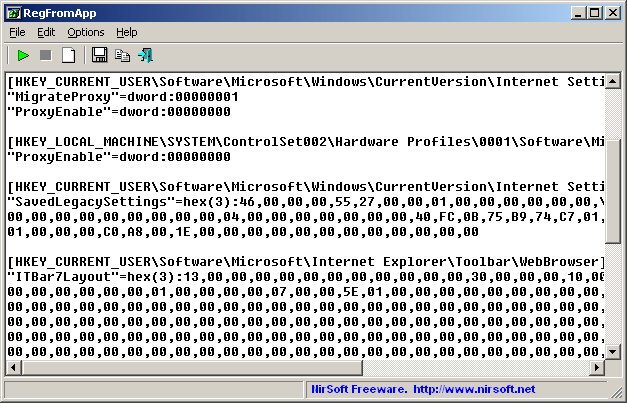
RegFromApp monitors the Registry changes made by the application that you selected, and
creates a standard RegEdit registration file (.reg) that contains all the Registry changes made by
the application.
You can use the generated .reg file to import these changes with RegEdit when it's needed.
System Requirements
This utility works on Windows 2000, Windows XP, Windows Server 2003, Windows Vista, Windows Server 2008, Windows 7, Windows 8, and Windows 10.
Older versions of Windows are not supported. There is a separated version for x64 applications.
Versions History
- Version 1.33:
- Fixed RegFromApp to avoid from BSOD when trying to attach to smss.exe (Be aware that RegFromApp will still fail to capture the smss.exe process)
- Version 1.32:
- When RegFromApp fails to load a dll into the program you want to trace, it now displays the correct error code and error message of Windows.
- Version 1.31:
- When you try to trace 32-bit program from RegFromApp 64-bit, it now
clearly instructs you to use the 32-bit version of RegFromApp. (In previous versions it displayed 'Error code: 65518')
- Version 1.30:
- Fixed to work with Windows 8.
- Fixed bug: On value names with '\' character, RegFromApp added a single '\' character instead of 2 '\' characters.
- Fixed bug: RegFromApp added incorrectly the Registry keys under HKEY_CURRENT_USER\Software\Classes.
- Fixed bug: On default values, RegFromApp added empty string instead of '@' character.
- Version 1.23:
- Fixed issue: On systems with multiple monitors, the dialog-boxes of ProcessActivityView opened in the wrong monitors, instead of the monitor where the main window is located.
- Version 1.22:
- Fixed small issue: Ctrl+N (Start New Process) didn't work.
- Version 1.21:
- Fixed bug: On some Windows 7 systems, RegFromApp failed to attach a process or to created a new process
and crashed it.
- Version 1.20:
- RegFromApp now works properly with Windows 7.
- Added x64 version to work with x64 applications.
- Version 1.15:
- RegFromApp now automatically stops when the process that you inspect is terminated.
- RegFromApp now remembers that last sort in select process dialog-box.
- Added new command-line option: /AttachProcess
- RegFromApp now allows you to automatically save to .reg file and exit when the inspected process is terminated (/AutoSave in command-line)
- Version 1.10:
- New mode of RegFromApp - Display the original Registry values. (See below)
- RegFromApp now remembers that last settings of 'Start New Process'.
- Version 1.07:
- Added command-line support
- Added Drag & Drop support.
- Version 1.06:
- Fixed bug: When 'Add Only Modified Values' was checked, RegFromApp displayed Registry values that
were created and then deleted.
- Version 1.05:
- Added support for delete Registry values.
- New option: 'Add Only Modified Values' - If this option is selected,
a saved Registry value will be added only if it's different from the previous value.
- Added support for starting a new process.
- Version 1.00 - First release.
Using RegFromApp
RegFromApp doesn't require any installation process or additional dll files.
In order to start using it, simply run the executable file - RegFromApp.exe
After running it, select the process that you want to inspect, and click Ok.
After clicking Ok, each time that the selected process writes a value into the Registry,
the main window of RegFromApp will display the written value in Windows .reg file format.
You can copy & paste the desired values to another Registry file, or alternatively,
you can save the entire Registry changes into a .reg file by using the 'Save As' option.
Using RegFromApp In Windows Vista
RegFromApp can work in Vista even when UAC (User Account Control) is turned on,
as long as the process that you wish to inspect run in the same account and security context of
RegFromApp. However, if you want to inspect a process that runs under
administrator account, you must also run RegFromApp as administrator.
(right-click on RegFromApp.exe and choose 'Run As Administrator')
RegFromApp Display Modes
Starting from version 1.10, RegFromApp can work in 2 display modes:
- Show Last Modified Values (The default mode): In this mode, RegFromApp displays the last Registry changes made by the selected process.
- Show Original Values: In this mode, RegFromApp displays the original Registry values, as they were before the changes made by the selected process.
Command-Line Options
|
/AttachProcess <Process ID or .exe Filename>
|
Attach the existing process. You can specify a process ID or process filename.
| |
/RunProcess <exe filename>
| Run the specified process
| |
/ProcessParams <parameters>
| Specify parameters for the process that you run with /RunProcess.
| |
/StartImmediately <0 | 1>
| Specify the "Start Immediately" value (0 or 1).
| |
/RegFileVersion <4 | 5>
|
Specify the .Reg file version (4 or 5)
| |
/AddOnlyModifiedValues <0 | 1>
|
Specify the value for "Add Only Modified Values" (0 or 1)
| |
/AutoSave <.reg filename - modified> <.reg filename - original>
|
When you specify this option, RegFromApp automatically save the data to .reg files and exit when the
process that you inspect is terminated.
|
Examples:
RegFromApp.exe /RunProcess "f:\temp\myprocess.exe" /AutoSave "f:\temp\reg_modified.reg" "f:\temp\reg_original.reg"
RegFromApp.exe /AttachProcess "f:\temp\myprocess.exe"
RegFromApp.exe /AttachProcess 1528
Translating RegFromApp to other languages
In order to translate RegFromApp to other language, follow the instructions below:
- Run RegFromApp with /savelangfile parameter:
RegFromApp.exe /savelangfile
A file named RegFromApp_lng.ini will be created in the folder of RegFromApp utility.
- Open the created language file in Notepad or in any other text editor.
- Translate all string entries to the desired language.
Optionally, you can also add your name and/or a link to your Web site.
(TranslatorName and TranslatorURL values) If you add this information, it'll be
used in the 'About' window.
- After you finish the translation, Run RegFromApp, and all translated
strings will be loaded from the language file.
If you want to run RegFromApp without the translation, simply rename the language file, or move
it to another folder.
License
This utility is released as freeware.
You are allowed to freely distribute this utility via floppy disk, CD-ROM,
Internet, or in any other way, as long as you don't charge anything for this.
If you distribute this utility, you must include all files in
the distribution package, without any modification !
Disclaimer
The software is provided "AS IS" without any warranty, either expressed or implied,
including, but not limited to, the implied warranties of merchantability and fitness
for a particular purpose. The author will not be liable for any special, incidental,
consequential or indirect damages due to loss of data or any other reason.
Feedback
If you have any problem, suggestion, comment, or you found a bug in my utility,
you can send a message to nirsofer@yahoo.com
RegFromApp is also available in other languages. In order to change the language of
RegFromApp, download the appropriate language zip file, extract the 'regfromapp_lng.ini',
and put it in the same folder that you Installed RegFromApp utility.
|
|
