| |

| Mail PassView v1.93 - Extract lost email passwords
Copyright (c) 2003 - 2025 Nir Sofer
|
Related Utilities
Related Links
Description
Mail PassView is a small password-recovery tool that reveals the passwords
and other account details for the following email clients:
- Outlook Express
- Microsoft Outlook 2000 (POP3 and SMTP Accounts only)
- Microsoft Outlook 2002/2003/2007/2010/2013/2016 (POP3, IMAP, HTTP and SMTP Accounts)
- Windows Mail
- Windows Live Mail
- IncrediMail
- Eudora
- Netscape 6.x/7.x (If the password is not encrypted with master password)
- Mozilla Thunderbird (If the password is not encrypted with master password)
- Group Mail Free
- Yahoo! Mail - If the password is saved in Yahoo! Messenger application.
- Hotmail/MSN mail - If the password is saved in MSN/Windows/Live Messenger application.
- Gmail - If the password is saved by Gmail Notifier application, Google Desktop, or by Google Talk.
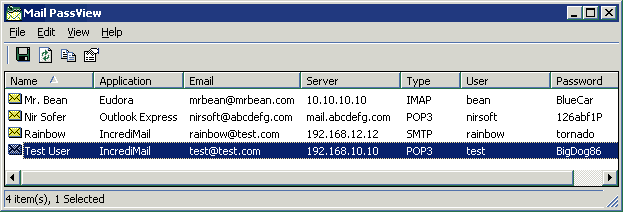
For each email account, the following fields are displayed:
Account Name, Application, Email, Server, Server Type (POP3/IMAP/SMTP),
User Name, and the Password.
If your email program is not supported by Mail PassView, you can still recover your password
by using this Password Sniffer
Known Problems
False Alert Problems: Some Antivirus programs detect Mail PassView utility as infected with Trojan/Virus.
Click here to read more about false alerts in Antivirus programs
If your Antivirus software shows a false alert, you can use the following article that explains how to send a report about a false positive
issue to your Antivirus company:
Dealing with False Positives: Reporting Issues to Antivirus Vendors
System Requrements
This utility works with any version of Windows, starting from Windows 98 and up to Windows 10.
Versions History
| 14/12/2025 | 1.93
|
- Updated to decrypt the passwords on the latest version of Thunderbird (146).
|
| 04/07/2021 | 1.92
|
- Fixed to decrypt the passwords on the latest versions of Thunderbird.
|
| 09/09/2020 | 1.91
|
- Fixed to display the SMTP accounts of ThunderBird.
|
| 23/11/2019 | 1.90
|
- Mail PassView now decrypts the passwords of ThunderBird directly without using the DLL files of ThunderBird.
|
| 27/06/2016 | 1.86
|
- Fixed to work with the latest version of ThunderBird (By handling logins.json file)
|
| 22/10/2015 | 1.85
|
- Added support for Outlook 2016.
|
| 03/11/2014 | 1.83
|
- Fixed to work with the latest versions of Mozilla Thunderbird.
|
| 17/09/2014 | 1.82
|
- Removed the command-line options that export the passwords to a file from the official version. A version of this tool with full command-line support will be posted on separated Web page.
|
| 02/07/2014 | 1.81
|
- Fixed bug: When Thunderbird had multiple mail accounts with the same mail server, Mail PassView displayed only one set of user/password for all records.
|
| 28/03/2013 | 1.80
|
- Added support for Outlook 2013.
|
| 05/05/2012 | 1.78
|
- Fixed bug: Mail PassView failed to get the password of thunderbird if the password file path contained non-English characters.
|
| 14/08/2011 | 1.77
|
- Added 'SMTP Server Port' column.
|
| 20/07/2011 | 1.76
|
- Added support for Thunderbird 5.x
|
| 30/05/2011 | 1.75
|
- Added 'SMTP Server' column, which displays the SMTP server for
POP3/IMAP accounts on Outlook, Windows Live Mail, and Outlook Express email clients.
|
| 05/04/2011 | 1.73
|
- Added 'Mark Odd/Even Rows' option, under the View menu. When it's turned on, the odd and even rows are displayed in different color, to make it easier to read a single line.
|
| 20/02/2011 | 1.72
|
- Fixed memory leak problems with Thunderbird accounts.
|
| 19/01/2011 | 1.71
|
- Added 'Copy Password' option (Ctrl+P).
|
| 07/11/2010 | 1.70
|
- Added an option to export the passwords into KeePass csv file (In 'Save Selected Items').
You can use the created csv file to easily import your email passwords into KeePass password manager.
- Added 'Add Header Line To CSV/Tab-Delimited File' option. When this option is turned on, the column names are added as the first line when you export to csv or tab-delimited file.
- You can now send the email passwords list to stdout by specifying an empty filename ("") in the command-line of all save parameters.
For example: mailpv.exe /stab "" >> c:\temp\passwords.txt
|
| 05/08/2010 | 1.65
|
- Added 'Password Strength' column, which calculates the strength of the password and displays it as
Very Weak, Weak, Medium, Strong, or Very Strong.
|
| 18/07/2010 | 1.60
|
- Added 'Secured' column (Yes/No), which specifies whether this email account uses a secured connection.
- Added 'Server Port' column, which displays the port number if the server uses non-standard
SMTP/POP3/IMAP port.
|
| 03/02/2010 | 1.55
|
- Added support for Mozilla Thunderbird 3.x (Thunderbird 3 must be installed on your system in order to retrieve the passwords)
|
| 21/09/2009 | 1.52
|
- Added /sort command-line option for sorting when you save the passwords list from command-line.
|
| 20/04/2009 | 1.51
|
- The accounts of Windows Live Mail are now also displayed if you changed the store folder location.
|
| 25/01/2009 | 1.50
|
- Added support for Windows Live Mail.
|
| 22/11/2008 | 1.46
|
- Added AutoComplete support to the 'Select Folders' dialog-box.
- 'Select Folders' dialog-box is now resizable.
|
| 02/10/2008 | 1.45
|
- Fixed bug: Exception window appeared when starting Mail PassView in some systems.
|
| 24/06/2008 | 1.44
|
- Fixed bug: The main window lost the focus when the user switched to another application and then returned back to Mail PassView.
|
| 23/04/2008 | 1.43
|
- Added support for saving as comma-delimited text file.
|
| 11/12/2007 | 1.42
|
- Added support for retrieving Hotmail/MSN mail accounts from the latest version of Windows Messenger.
- Added support for Gmail Notifier application under IE7.
|
| 27/10/2007 | 1.41
|
- Configuration is now saved to a file instead of the Registry.
|
| 14/09/2007 | 1.40
|
- Added support for SMTP and NNTP accounts on Windows Mail.
- Fixed problems with Thunderbird 2 accounts.
|
| 07/04/2007 | 1.38
|
- Added support for Windows Mail.
|
| 15/11/2006 | 1.37
|
- Added support for Gmail passwords stored by Google Desktop.
|
| 23/06/2006 | 1.36
|
- Fixed bug: Mail PassView didn't show Netscape/Thunderbird accounts when using save command-line options.
|
| 13/05/2006 | 1.35
|
- Added support for passwords stored by Google Talk.
|
| 18/12/2005 | 1.34
|
- Added support for newer versions of Gmail Notifier.
|
| 27/11/2005 | 1.33
|
- Added support for IMAP accounts in Mozilla Thunderbird
- New column: Profile - displayed for Outlook Express and MS-Outlook 2002/2003.
- Option to select another folder/file for Thunderbird, Netscape, and Eudora.
|
| 26/08/2005 | 1.32
|
- Added support for Hotmail/MSN mail password stored by MSN Messenger v7.5
- Added support for Windows XP style.
|
| 10/12/2004 | 1.31
|
Fixed bug with Mozilla Thunderbird accounts.
|
| 05/11/2004 | 1.30
|
- Added support for Netscape 6.x/7.x and Mozilla Thunderbird.
- Added support for Yahoo! Mail - If the password is saved in Yahoo! Messenger application.
- Added support for Hotmail/MSN mail - If the password is saved in MSN Messenger application.
- Added support for Gmail - If the password is saved by Gmail Notifier application.
- Passwords of Outlook Express are now decrypted even if they are not stored in the Protected Storage.
|
| 22/06/2004 | 1.20
|
- Added support for Outlook 2003.
- All Outlook accounts are now displayed, even if their password is not stored in the system.
- New options: Choose Columns, HTML reports, find, and more...
- Ability to translate to other languages.
|
| 02/06/2003 | 1.13
|
- Added support for multiple identities in Outlook Express.
- In Eudora and Incrdimail accounts - The accounts are now displayed even if there is no password.
|
| 30/05/2003 | 1.12
|
Starting from this version, all accounts of Eudora are shown, not only the Dominant account.
|
| 23/05/2003
| 1.11
|
Fixed bug: In previous version, Mail PassView failed to display IncrediMail accounts in some computers.
|
| 15/05/2003
| 1.10
|
- Added support for SMTP accounts in MS Outlook 2000 and Outlook Express.
- Added support for POP3, IMAP, HTTP and SMTP Accounts in MS Outlook 2002
- Saving accounts information into HTML file.
|
| 30/04/2003
| 1.00
| First Release
|
License
This utility is released as freeware. You are allowed to freely use it at your home
or in your company. However, you are not allowed to make profit from this software or to
charge your customers for recovering their passwords with this software, unless you got a permission from the software author.
You are also allowed to freely distribute this utility via floppy disk, CD-ROM,
Internet, or in any other way, as long as you don't charge anything for this.
If you distribute this utility, you must include all files in
the distribution package, without any modification !
Disclaimer
The software is provided "AS IS" without any warranty, either
expressed or implied, including, but not limited to, the implied
warranties of merchantability and fitness for a particular purpose.
The author will not be liable for any special, incidental,
consequential or indirect damages due to loss of data or any
other reason.
Using the Mail PassView utility
This utility is a standalone executable. It doesn't require any installation
process or additional DLLs. Just run the executable (mailpv.exe) and watch
the list of your email accounts.
You can save the accounts information into a text file or copy them to the
clipboard.
Getting email passwords from another instance of Windows ?
Many people ask me whether it's possible to extract the email passwords from an external instance of Windows that cannot boot.
For now, Mail PassView can only retrieve the passwords from external drive for Mozilla Thunderbird, Netscape, and Eudora.
It's possible that external drive support for more email applications will be added in the future.
In order to do that, you must go to 'Select Folders/Files' window (F6) and manually select the right folders in the external drive.
Notice: If the filename contains one or more space characters, you must
enclose it with quotes ("").
Translating Mail PassView to other languages
Mail PassView allows you to easily translate all dialog-boxes, menus, and strings
to other language.
In order to do that, follow the instructions below:
- Run Mail PassView with /savelangfile parameter:
mailpv.exe /savelangfile
A file named mailpv_lng.ini will be created in the folder of Mail PassView utility.
- Open the created language file in Notepad or in any other text editor.
- Translate all menus, dialog-boxes, and string entries to the desired language.
- After you finish the translation, Run Mail PassView, and all translated
strings will be loaded from the language file.
If you want to run Mail PassView without the translation, simply rename the language file, or move
it to another folder.
Feedback
If you have any problem, suggestion, comment, or you found a bug in my utility,
you can send a message to nirsofer@yahoo.com
Mail PassView is also available in other languages. In order to change the language of
Mail PassView, download the appropriate language zip file, extract the 'mailpv_lng.ini',
and put it in the same folder that you Installed Mail PassView utility.
|
|
